Task breakdown is the step between having a goal and doing the work. You think the work through, split it into parts that one person can finish, and record those parts where the team can see them. This guide covers how to think a task through before you start, how to break down a project into tasks with a simple work breakdown structure, how to test the plan with a premortem, and how to capture the result as cards, subtasks and checklists on a kanban board.
Why think the work through first
Thinking costs less than building. A mistake made during the work costs time to undo and explain, but a mistake found while you think costs nothing.
A mental run-through does four specific jobs:
- It forces you to state the problem in words, which shows whether you understand it.
- It shows what information is missing before you are halfway through the work.
- It lets you compare two or three approaches and pick one on purpose.
- It gives you a picture of the finished result, so you know when you are done.
Sitting and thinking can feel like doing nothing, especially when everyone around you is busy. Treat the time as part of the work, and give it a fixed limit.
A five-step run-through
Try this before any task that will take more than a few hours:
- Restate the problem in one or two sentences. If you cannot, ask questions before you continue.
- List the inputs and outputs. Write what you have now and what must exist at the end.
- Sketch two approaches. A weak second option still shows the strengths and gaps of the first.
- Walk through the chosen approach step by step. Note each point where you hesitate, because those are the risks.
- Name the first step. Start the work only when you know what it is.
For a task of one day, this takes about twenty minutes. For a project of several weeks, give it an afternoon.
How to break down a project into tasks
Once you know the outcome and the approach, split the work. The most common method starts at the top and works down:
- Write the outcome as one sentence, such as “the client site runs on the new host with no lost email or broken links.”
- List the main deliverables. These are the large parts of the result, such as a migrated database, working email and verified redirects.
- Split each deliverable into tasks. A task is a piece of work that one person can pick up and finish.
- Keep splitting a task while it is still too big to estimate, or while it needs more than one owner.
- Check the whole list against the outcome. Add what is missing, and remove what is not needed for the outcome.
When to stop splitting
A task is small enough when it passes these checks:
- One owner. One person is responsible for finishing it.
- One clear result. You can say in a sentence what “done” looks like.
- A size you can estimate. Many teams aim for tasks that take from a few hours to a few days.
- A verb in the title. “Update DNS records” tells the owner what to do, and “DNS” does not.
Stop splitting before tasks shrink to single clicks or keystrokes. Small steps that the same person does in one sitting belong in a checklist inside a task, not as separate tasks.
The work breakdown structure
A work breakdown structure (WBS) is the formal version of this method. NASA’s Work Breakdown Structure Handbook defines it as “a product-oriented family tree that identifies the hardware, software, services, and all other deliverables required to achieve an end project objective.” The handbook says its purpose is “to subdivide the project’s work content into manageable segments.”
Two ideas from the WBS are useful on any project, large or small:
- Break down by deliverable, not by activity type. “Migrated database” is a deliverable. “Testing” is an activity, and it appears under every deliverable.
- Cover the whole scope, and only the scope. The NASA handbook states that “work scope not contained in the project WBS should not be considered part of the project.” Practitioners call this the 100% rule: the parts of each level add up to exactly the level above.
Worked example: migrating a client site
Suppose you are moving a client’s WordPress site to a new host. The impulse is to start copying files. A WBS for the same job looks like this:
| Deliverable | Tasks |
|---|---|
| Inventory | List plugins, scheduled jobs, email accounts and DNS records; record current redirects |
| New environment | Set up hosting, PHP version and SSL certificate; create a staging site |
| Migrated site | Copy files and database; replace URLs; test forms and checkout on staging |
| Email and DNS | Recreate email accounts or MX records; lower the DNS TTL (how long other servers cache DNS records) a day before; switch DNS |
| Verification | Check redirects, scheduled jobs and contact forms on the live site; confirm backups run |
| Rollback plan | Keep the old host active for a week; write the steps to switch DNS back |
Writing the table takes about fifteen minutes. It surfaces two tasks that the copy-files approach misses: the scheduled jobs and the DNS TTL change. Without the table, you would find those problems after launch.
Test the breakdown with a premortem
A task list shows what you plan to do. It does not show what could go wrong. Psychologist Gary Klein designed the premortem for that gap and described it in Harvard Business Review in 2007. In a premortem, the team assumes the project “has just failed” and explains why. Our guide to running a premortem has a template, timings and a worked example.
Klein cites a 1989 study by Deborah Mitchell, Jay Russo and Nancy Pennington on “prospective hindsight”, which means imagining that an event has already happened. He reports that prospective hindsight increased people’s ability to identify reasons for future outcomes by 30%, but the study’s abstract does not state that figure. It reports that people gave longer and more specific explanations for events they treated as certain. The study was published as “Back to the future: Temporal perspective in the explanation of events”.
To run a premortem on your breakdown:
- Share the plan with everyone who will work on it.
- Say: “It is three months from now, and this project failed. Why?”
- Give each person a few minutes to write reasons on their own.
- Go around the group and collect one reason per person until the list is complete.
- For each serious reason, add a task, a check or a dependency to the plan.
In the migration example, a premortem might produce “the client’s email stopped for a day because MX records, the DNS records that route email, were not copied.” That reason becomes a task in the Email and DNS row.
Capture the breakdown on a kanban board
A plan helps only if the team can see it while they work. On a kanban board, each part of the breakdown has a place. In KanbanWP, a free WordPress plugin:
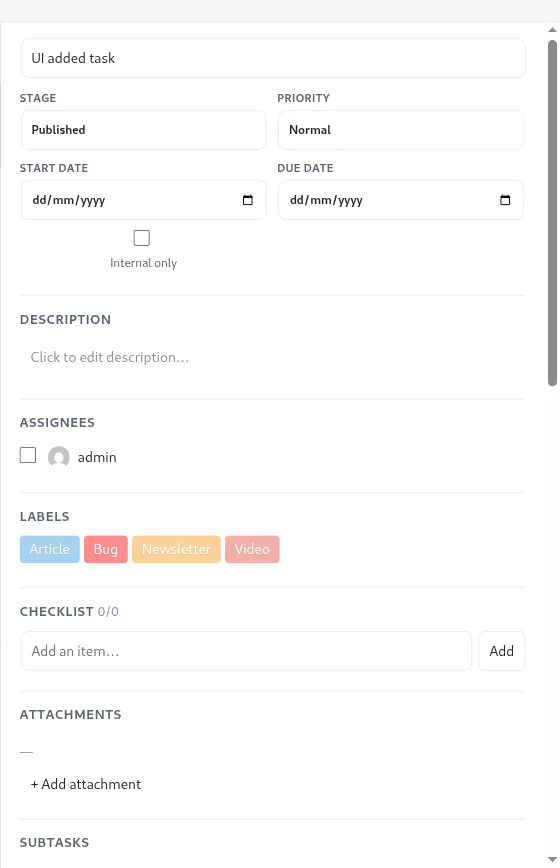
- Each task becomes a card. Write the result in the title, and the restated problem and inputs in the description.
- Steps that need their own owner become subtasks. A subtask is a full task with its own assignees, due date and comments. KanbanWP creates it in the same stage as its parent, and the parent card shows a subtask count.
- Small steps become a checklist. Each task has one checklist, and the card shows progress such as 2/5.
- Order between tasks goes in “Blocked by”. Add the ID of the task that must finish first. The card shows how many blockers it has. Dependencies are informational, so KanbanWP does not stop you from moving a blocked card.
For the migration, the deliverables can become cards with the tasks as subtasks. Alternatively, each task can be its own card with the smaller steps in its checklist. Use subtasks where different people do the work, and checklists where one person does.
KanbanWP 1.0.1 also has an AI task breakdown feature that suggests subtasks for a task, using your own AI provider key. In this version it is available only through the REST API, the plugin’s developer interface, not as a button on the board. The API returns suggested titles and descriptions, and it creates nothing until you add the subtasks yourself. See AI in KanbanWP.
Common task breakdown mistakes
- Stopping too early. A task such as “Build website” cannot be estimated or assigned. Split it until each part has one owner.
- Splitting too far. Fifty tiny cards make the overall plan hard to see. Move the small steps into checklists.
- Breaking down by activity type. Lists of “Design”, “Build” and “Test” tasks with no deliverable make it hard to see when anything is finished.
- Forgetting work outside the main deliverable. Communication, review, testing and rollback are easy to leave out. A premortem helps you find them.
- Planning forever. If the breakdown keeps growing and nobody starts, set a time limit, write down what you know, and begin with the first task.
Breaking down the work is one part of planning. Our guide to project planning steps covers the rest, including estimates and schedules. To set up a board for the tasks, follow your first board, and see task best practices for writing cards that are easy to act on.
Frequently asked questions
How do you break down a project into tasks?
Write the outcome first, split it into the main deliverables, then split each deliverable into tasks until each task has one owner, one clear result and fits in a few days of work. Check that the tasks together cover the whole project and nothing outside it.
What is a work breakdown structure?
A work breakdown structure (WBS) is a hierarchy that divides a project's total work into smaller, manageable parts. NASA's WBS Handbook describes it as a product-oriented family tree of everything the project must deliver.
What is a premortem?
A premortem is a short exercise from psychologist Gary Klein. Before work starts, the team imagines that the project has already failed and writes down every reason why, so the plan can address those risks early.
Should I use subtasks or a checklist?
Use a checklist for small steps that the same person finishes inside one task. Use subtasks when a step needs its own owner, due date or comments.