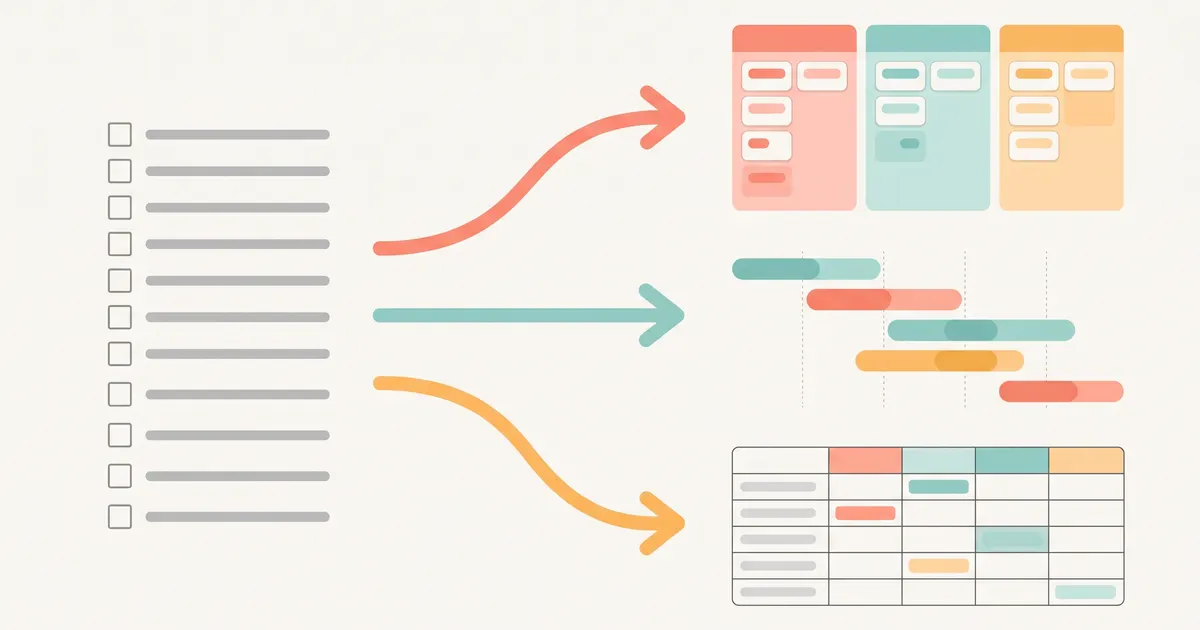
Asana alternatives fall into three groups: hosted tools with a bigger free plan or a lower price, tools built for one kind of work such as software or client projects, and open-source software you run on your own server. This guide compares 13 of them. Free-plan limits and prices were checked on each vendor’s pricing page on November 1, 2026. For each tool, the guide also shows which plan replaces the Asana features you pay for. KanbanWP, one of the options, is our own plugin.
The short version, based on the prices and limits below:
- Best free plans for 3 or more people: Plaky Free and ClickUp Free Forever (unlimited users), Jira Free (up to 10 users) and Trello Free (10 collaborators per Workspace).
- Cheapest paid plan: Plaky Pro at $3.99 per seat per month, billed annually.
- Time tracking for less than Asana Advanced: ClickUp Core at $9 per user per month, billed yearly.
- Software teams: Jira.
- Data on your own server: OpenProject Community or KanbanWP.
Why teams look for an Asana alternative
Asana organizes work as projects made of tasks, with list, board, calendar and timeline views. The limits below come from the Asana pricing page, as of November 2026:
- The free Personal plan allows 2 users, with unlimited tasks and projects and list, board and calendar views.
- Starter costs $10.99 per user per month billed annually, or $13.49 billed monthly. It adds timeline and Gantt views, unlimited automations, forms, custom fields, reporting dashboards and unlimited free guests.
- Advanced costs $24.99 per user per month billed annually, or $30.49 billed monthly. Portfolios, goals, resource management, approvals and proofing, and time tracking start on this plan.
- Files can be up to 100MB each on every plan.
- Asana is a hosted service only. There is no version you can install on your own server.
Teams usually switch for one of four reasons. A third person joins and the free plan stops working. Time tracking or workload planning means moving every user to Advanced. The team wants a tool built for one job, such as software sprints or billable client work. Or the data has to stay on a server the team controls.
Asana alternatives compared
| Tool | Free plan | Paid plans from | Self-hosted |
|---|---|---|---|
| Asana | Up to 2 users | $10.99 per user per month, billed annually | No |
| ClickUp | Unlimited members, 60MB storage | $9 per user per month, billed yearly | No |
| monday.com | Up to 2 seats, 3 boards | $9 per seat per month, billed annually, 3-seat minimum | No |
| Trello | Up to 10 collaborators, 10 boards per Workspace | $5 per user per month, billed annually | No |
| Wrike | Free plan with board and table views | $10 per user per month, billed annually | No |
| Jira | Up to 10 users, 2GB storage | $8.48 per user per month | No |
| Notion | Unlimited for one person, limited blocks for 2+ members | $10 per member per month | No |
| Basecamp | 1 project, up to 3 users | $29 per month for the account | No |
| Teamwork.com | Up to 5 users, 5 projects | $9.99 per user per month, billed annually, 3-user minimum | No |
| Smartsheet | No free plan, 30-day trial | $9 per member per month, billed yearly | No |
| Plaky | Unlimited users, 6 fields per board | $3.99 per seat per month, billed annually | No |
| Microsoft Planner | One-month trial of paid plans | $10 per user per month, paid yearly | No |
| OpenProject | Community edition (GPL v3) | €5.95 per user per month, 25-user minimum | Yes |
| KanbanWP | Free plugin (GPLv2) | None | Yes, in WordPress |
Prices are in US dollars unless marked, and were checked on each vendor’s pricing page on November 1, 2026.
What each tool costs for a team of 5 or 10
The table uses each tool’s entry-level paid plan at the annual price, per month. A free plan is shown where it covers the whole team.
| Tool and plan | 5 users | 10 users |
|---|---|---|
| Asana Starter | $54.95 | $109.90 |
| Asana Advanced | $124.95 | $249.90 |
| ClickUp Core | $45 | $90 |
| monday.com Basic | $45 | $90 |
| Trello Standard | $25 | $50 |
| Wrike Team | $50 | $100 |
| Jira Free | $0 | $0 |
| Basecamp Freelancer (5 users) or Pro (10 users) | $29 | $79 |
| Teamwork.com Basics | $49.95 | $99.90 |
| Smartsheet Pro | $45 | $90 |
| Plaky Free | $0 | $0 |
| Plaky Pro | $19.95 | $39.90 |
| Microsoft Planner Plan 1 | $50 | $100 |
The entry plans include different features. Trello Standard has no timeline view, for example, and Basecamp’s flat price caps the number of active projects. The sections below say what each plan includes.
Hosted project management tools
ClickUp
ClickUp puts tasks, docs, whiteboards and chat in one workspace. Its pricing page lists a Free Forever plan with unlimited members, 60MB of storage and 100 automation actions a month. Gantt charts and time tracking are available on Free as a trial only.
Core costs $9 per user per month billed yearly and adds Gantt charts, time tracking and 1,000 automation actions a month. Business costs $17 per user per month billed yearly and adds timesheets and 10,000 automation actions.
Fits: teams that want time tracking and Gantt charts for less than Asana Advanced. Limits: the 60MB of free storage covers the whole workspace, attachments included.
monday.com
monday.com builds work around boards, where each item is a row and each detail is a column. The monday.com pricing page lists a Free plan for up to 2 seats, 3 boards and 3 docs. Paid plans start from 3 seats. Basic costs $9 per seat per month billed annually, Standard costs $12 and Pro costs $19.
Timeline and Gantt views start on Standard, and time tracking starts on Pro. Standard includes 250 automation actions a month, and Pro includes 25,000.
Fits: teams that track many kinds of records, such as clients, orders or requests, as well as projects. Limits: the free plan stops at 2 seats, the same as Asana. For more options in this group, read the best monday.com alternatives.
Trello
Trello is a kanban board tool owned by Atlassian. The Trello pricing page lists a Free plan for up to 10 collaborators per Workspace, with up to 10 boards per Workspace and files up to 10MB each.
Standard costs $5 per user per month billed annually, or $6 billed monthly, and removes the board limit. Calendar, Timeline, Table, Dashboard and Map views need Premium, at $10 per user per month billed annually or $12.50 monthly.
Fits: teams that work mainly on kanban boards and do not need a timeline. Limits: to get a timeline view, you need Premium, which costs about the same as Asana Starter. For more options in this group, read the best Trello alternatives in 2027.
Wrike
Wrike is a work management tool for teams that run many projects at once. Its pricing page lists a Free plan with project and task management, board and table views, and web, desktop and mobile apps.
Team costs $10 per user per month billed annually, for 2 to 15 users, and adds Gantt charts and shareable dashboards. Business costs $25 per user per month for 5 to 200 users, and Business and higher plans are annual only. Advanced resource and capacity planning and budgeting are on Pinnacle, which has no listed price.
Fits: departments that need Gantt charts and reports across many projects. Limits: the Team plan stops at 15 users.
Jira
Jira is Atlassian’s tool for software teams, with boards, backlogs and sprints. Atlassian’s plan overview says the Free plan allows up to 10 users, 2GB of storage and 150 automation steps. Standard adds 250GB of storage and 400 automation steps per user per month. The Jira pricing page lists Standard at $8.48 per user per month.
Fits: software teams that plan work in sprints and track bugs. Limits: its issue types, workflows and sprint terms are built for software work.
Notion
Notion is a document and database tool, and a database can be shown as a board. According to Notion’s pricing page, the Free plan is unlimited for one person but has a limited number of blocks once two or more members share a workspace. Free also limits uploads to 5MB per file.
Plus is listed at $10 per member per month and Business at $20, and the page says yearly billing saves up to 20%.
Fits: teams that keep specs, notes and task lists in one place. Limits: you build each project tracker yourself from a database, so setup takes longer than in Asana.
Basecamp
Basecamp is a hosted project tool with to-do lists, message boards, schedules and file storage in each project. Its pricing page prices each plan per account, not per user:
- Free allows 1 project, 1GB of storage and up to 3 users.
- Freelancer costs $29 a month for up to 3 active projects and 5 users.
- Pro costs $79 a month for up to 8 active projects and 10 users.
- Pro Plus costs $99 a month for up to 12 active projects and 15 users.
- Pro Unlimited costs $199 a month billed annually, or $329 billed monthly, with unlimited projects and users and 1TB of storage.
Archived projects do not count toward the active project limit.
Fits: small teams and clients who want a simple tool and a bill that does not grow with each person. Limits: every plan below Pro Unlimited caps both users and active projects.
Teamwork.com
Teamwork.com is a project management tool aimed at agencies and client work. Its pricing page lists a Free plan for up to 5 users, 5 projects and 100MB of storage.
Basics costs $9.99 per user per month billed annually, with a minimum of 3 users, 300 projects and 100GB of storage. Accelerate costs $24.99 per user per month billed annually, with a minimum of 5 users.
Fits: agencies that bill clients for project work. Limits: the free plan allows only 5 projects.
Smartsheet
Smartsheet is a spreadsheet-style work management tool. Its pricing page lists no free plan, only a 30-day free trial.
Pro costs $9 per member per month billed yearly, or $12 billed monthly, for 1 to 10 members. Business costs $19 billed yearly or $24 monthly, with a minimum of 3 members.
Fits: teams that already plan in spreadsheets and want Gantt charts on top. Limits: there is no free plan.
Plaky
Plaky is a board tool where each item is a row and each detail is a field. Its pricing page lists a Free plan for unlimited users, with Table, Kanban and Chart views. Free boards are limited to 6 fields each, files to 10MB each, and the activity log keeps 7 days. Automations are not part of the Free plan.
Pro costs $3.99 per seat per month billed annually, or $4.99 billed monthly, and adds the Gantt view. Enterprise costs $8.99 per seat per month billed annually.
Fits: teams of three or more that need a free plan, or a timeline for less than half the price of Asana Starter. Limits: each free board can hold only 6 fields.
Microsoft Planner
Microsoft Planner is Microsoft’s task and project tool. Microsoft’s Planner plans page lists Planner Plan 1 at $10 per user per month, paid yearly, with task dependencies, reports and a Timeline (Gantt) view. Planner and Project Plan 3 costs $30 per user per month and adds Project desktop and Project Online. Both plans have a one-month free trial.
Fits: teams that already work in Microsoft 365. Limits: the Gantt view is on a paid plan.
Open source and self-hosted Asana alternatives
Self-hosted tools have no per-seat fee for the software. You pay for the server instead, and you handle backups and updates.
OpenProject
OpenProject is project management software released under GPL v3. Its Asana comparison page notes that OpenProject can run in its cloud or on your own server, while Asana is cloud only.
The OpenProject pricing page describes the Community edition as free with no minimum users. Its feature list includes Gantt charts and timelines, agile and kanban boards, time tracking and a wiki. Enterprise plans start at €5.95 per user per month for Basic, with a minimum of 25 users.
Fits: teams that want Asana Advanced features such as timelines and time tracking on their own server. Limits: support for Community is community forums and guides only.
KanbanWP
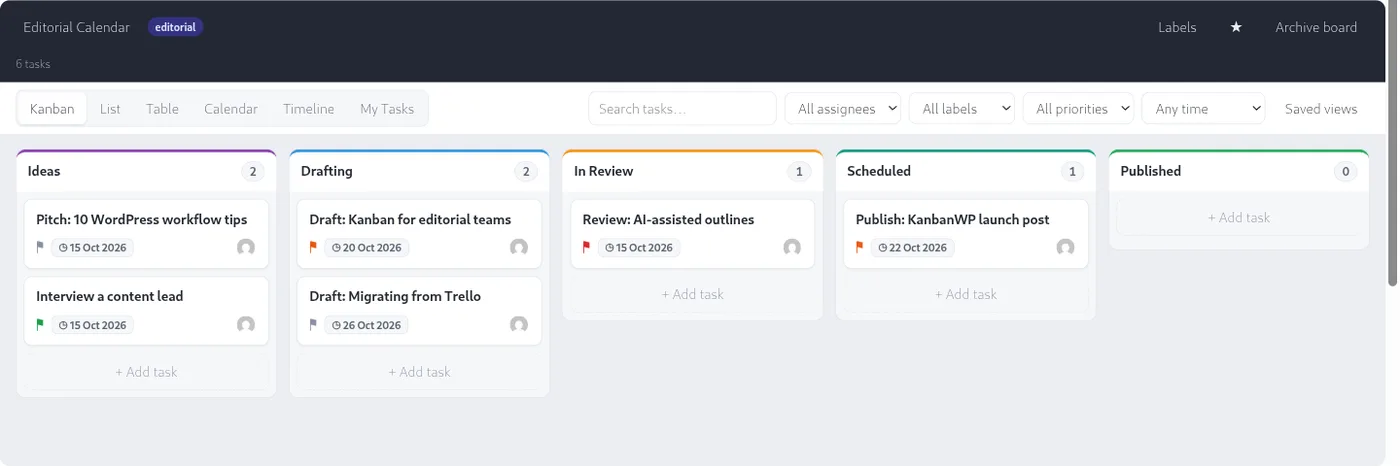
KanbanWP is a free GPLv2 plugin that adds kanban boards to the WordPress admin. People sign in with their WordPress accounts, and boards, tasks and comments are stored in your WordPress database. There are no seat fees and no paid plans.
KanbanWP has:
- Unlimited boards, with stages, drag and drop and WIP limits per stage.
- Kanban, List, Table, Calendar, Timeline and My Tasks views, plus swimlanes and saved views.
- Tasks with priorities, due dates, assignees, labels, checklists, attachments and custom fields.
- Subtasks and dependencies between tasks.
- Board roles (admin, member, viewer and client) and a client portal that hides internal tasks and comments.
- Outgoing webhooks, Slack and Discord notifications, and tasks created from WooCommerce orders.
Fits: teams that already run a WordPress site and want their boards there. See how teams use it for project management. Limits: KanbanWP has no time tracking, portfolios or goals. You handle hosting, backups and updates, and there is no native mobile app, though the board works in a mobile browser.
Which plan replaces each Asana feature
If you use one paid Asana feature, compare the plan you would need in each tool.
| Asana feature (Asana plan) | Where it is in other tools |
|---|---|
| Timeline and Gantt (Starter) | ClickUp Core, monday.com Standard, Trello Premium, Wrike Team, Plaky Pro, Planner Plan 1, OpenProject Community, KanbanWP |
| Automations (Starter, unlimited) | ClickUp Free (100 a month), Core (1,000), monday.com Standard (250), Jira Free (150 steps) |
| Unlimited free guests (Starter) | KanbanWP client role (no seat fees) |
| Time tracking (Advanced) | ClickUp Core, monday.com Pro, OpenProject Community |
| Resource management (Advanced) | Wrike Pinnacle (advanced resource and capacity planning) |
| More than 2 free users (none) | Plaky Free, ClickUp Free, Trello Free, Jira Free, Teamwork.com Free, Basecamp Free |
Moving your projects out of Asana
Asana can export a project to a CSV file from the project’s menu. The Asana guide to CSV export lists the fields in the file, including the task name, assignee, due date, tags, notes, project name and, for subtasks, the parent task.
The CSV holds tasks and their fields. Comments, attachments, rules and project views are not part of it, so plan to set those up again in the new tool. Most of the tools above can import a spreadsheet. To start from a ready board layout instead, see the kanban board templates.
To move a project into KanbanWP:
- Export the project from Asana to CSV.
- Open the file in a spreadsheet app and rename the columns you want to keep to KanbanWP’s headers:
title,description,stage,priority,assignee,due_date,start_dateandlabels. Use the section or column name forstage, and the assignee’s email address forassignee. - Save the sheet as a CSV file.
- In WordPress, go to KanbanWP > Import / Export and upload the file under CSV.
Each row becomes a task, and stage names that do not exist yet are created on the new board. Assignees are matched to WordPress users by username, then by email address. The details are in importing and exporting boards.
Which Asana alternative fits which team
| Your situation | Tools to compare |
|---|---|
| 3 or more people, no budget | Plaky Free, ClickUp Free, Trello Free, Jira Free |
| Timeline view for less than Asana Starter | Plaky Pro, ClickUp Core, Wrike Team |
| Time tracking without Asana Advanced | ClickUp Core, monday.com Pro, OpenProject |
| Software teams and sprints | Jira |
| Client and agency work | Teamwork.com, Basecamp, KanbanWP |
| A bill that does not grow per person | Basecamp |
| Microsoft 365 teams | Microsoft Planner |
| Data on your own server | OpenProject, KanbanWP |
For a list limited to free tools, see best free kanban board software in 2027. For a full KanbanWP feature list, see features.
Frequently asked questions
What is the best free alternative to Asana?
It depends on team size. Plaky Free and ClickUp Free Forever allow unlimited users, Jira Free allows up to 10 users, and Trello Free allows 10 collaborators per Workspace. Asana's free Personal plan stops at 2 users.
What is the cheapest alternative to Asana?
Among paid hosted plans, Plaky Pro costs $3.99 per seat per month and Trello Standard costs $5 per user per month, both billed annually. Asana Starter costs $10.99 per user per month billed annually. OpenProject Community and KanbanWP cost nothing for the software, but you pay for the server.
Is there a Microsoft equivalent to Asana?
Microsoft Planner is Microsoft's task and project tool. Planner Plan 1 costs $10 per user per month paid yearly and includes a Timeline (Gantt) view and task dependencies.
Is there an open source alternative to Asana?
Yes. OpenProject Community is released under GPL v3 and includes Gantt charts, boards and time tracking. KanbanWP is a GPLv2 WordPress plugin with kanban, list, table, calendar and timeline views. You host both yourself.
Can I move my projects from Asana to another tool?
Yes. Asana can export a project to a CSV file, and most of the tools in this guide can import a spreadsheet. Comments, attachments and automation rules usually do not come across, so plan to set those up again.