WordPress project management plugins let you plan and track team work inside the WordPress admin, with no separate tool, login or bill. This page compares the main WordPress project management plugins on WordPress.org as of October 2026, then describes what KanbanWP does and a project setup you can copy. KanbanWP is our own plugin.
Who a WordPress project management plugin suits
A project management plugin suits small teams, agencies and freelancers who already work in WordPress every day. Your project data stays in your own database, and your team uses the WordPress accounts it already has. A hosted tool such as Trello or Asana suits teams that do not run WordPress, or that need mobile apps and many third-party integrations. See KanbanWP vs Trello for one direct comparison.
WordPress project management plugins compared
These figures come from each plugin’s WordPress.org page, checked on October 20, 2026. Active installs are rounded by WordPress.org.
| Plugin | Active installs | Last updated | Kanban board in free version |
|---|---|---|---|
| FluentBoards | 6,000+ | October 2026 | Yes |
| Project Manager by weDevs | 5,000+ | September 2026 | Yes, since version 4.0.6 |
| Zephyr Project Manager | 1,000+ | October 2026 | No, Pro only |
| Taskbuilder | 700+ | October 2026 | Yes |
| UpStream | 500+ | August 2026 | No |
FluentBoards
FluentBoards organizes tasks on kanban boards with stages, assignees, labels, priorities, subtasks, comments and attachments. It connects with FluentCRM and Fluent Forms from the same company. The FluentBoards pricing page lists the calendar and table views as Pro features, while the kanban and list views are free.
Project Manager by weDevs
Project Manager organizes work into projects with task lists, milestones and threaded messages, and it can generate a task list from a project description with AI. Its changelog says the kanban board moved into the free plugin in version 4.0.6. The WordPress.org page lists Gantt charts, time tracking, invoices, subtasks and recurring tasks as Pro features, sold on the weDevs pricing page.
Zephyr Project Manager
Zephyr’s free version has unlimited projects and tasks, subtasks, a calendar, file management, progress charts and an Android app. Kanban boards, custom fields, project templates and reports are listed as Pro features.
Taskbuilder
Taskbuilder’s free version has a kanban board, a list view, subtasks, checklists, custom statuses, a client access mode and front-end shortcodes. Calendar view, custom fields, time tracking, Gantt charts and reports are paid add-ons.
UpStream
UpStream is built around projects with milestones, tasks, a bug tracker and a client login page. Its timeline, calendar view and email notifications are paid extensions. Version 2.1.1 came out in August 2026, about two years after version 2.1.0 in May 2024.
A closed plugin
Panorama, another project management plugin, was closed on WordPress.org on December 10, 2024, for a security issue, and it cannot be downloaded there. Before you install any plugin, check its WordPress.org page for a closure notice and for a warning that it has not been tested with recent WordPress releases.
What KanbanWP does for project management
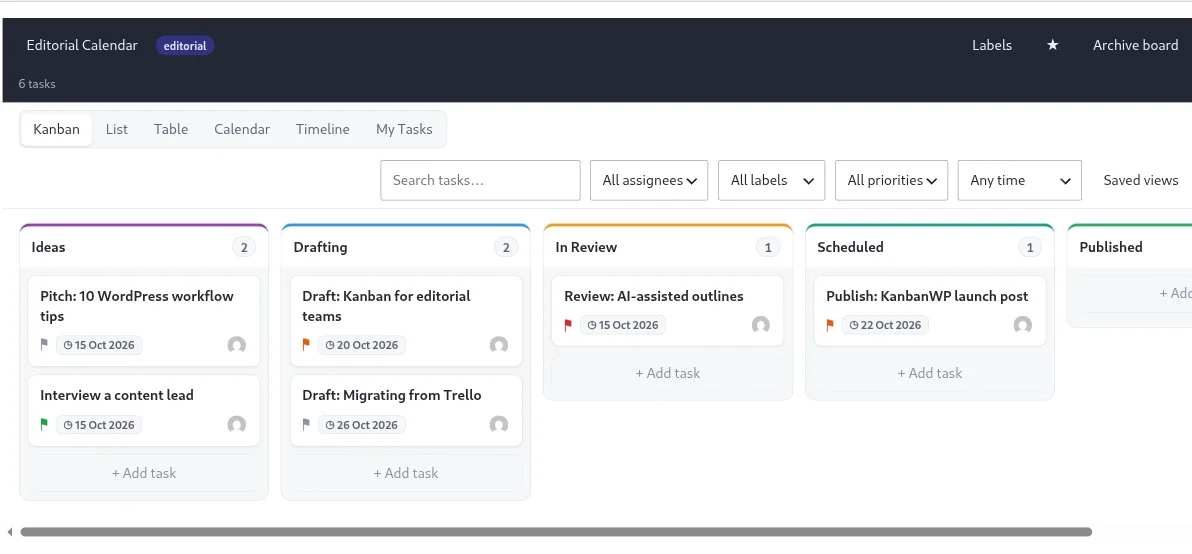
KanbanWP is a free WordPress plugin, licensed GPLv2, with no paid version. It stores boards, tasks and comments in tables in your WordPress database. Its project features are:
- Boards and templates. Create unlimited boards from five templates: Editorial, Client, Sales, Bugs and Blank.
- Tasks. Each task has assignees, a priority, start and due dates, labels, a checklist, attachments and custom fields.
- Subtasks and dependencies. Break work into subtasks and mark which tasks block another. See subtasks and dependencies.
- Recurring tasks. Repeat a task daily, weekly or monthly.
- Six views. Kanban, list, table, calendar, timeline and My Tasks, with saved views for filters you reuse. See views.
- WIP limits. A stage shows its task count against its limit and is marked when it goes over. The limit warns but does not block a move.
- Roles. Each board has admin, member, client and viewer roles. See permissions and roles.
- Client access. Clients see only tasks and comments that are not marked internal. See the client portal.
- Reports. Task totals by stage and priority, overdue tasks, workload per member and a cumulative flow chart, with a CSV download. See reports.
- Imports. Move work in from a Trello JSON export or a CSV file.
- AI and MCP. AI features run on your own provider key through the REST API, and an MCP server lets AI agents read and update tasks. See AI project management.
KanbanWP has limits you should know about before you choose it:
- It has no time tracking, no Gantt chart and no invoicing.
- Swimlanes are turned on per board through the REST API.
- Cycle time in Reports runs from when a task is created to when it enters the board’s last stage, so it includes time spent waiting in the backlog. Version 1.0.0 did not record completion, so its cycle time stayed at zero. See reports.
A suggested project setup
This setup suits an agency or a small team running several client projects.
1. Choose the stages
The Client template gives you five stages that fit most project work:
| Stage | What belongs here |
|---|---|
| Backlog | Requests nobody has committed to yet |
| In Progress | Work someone is doing now |
| In Review | Finished by the author, waiting for a check |
| Approved | Accepted by the reviewer or the client |
| Done | Delivered |
If you need other stages, upload a CSV through Import / Export with a stage column. KanbanWP creates a new board with those stages, in the order they first appear in the file. See exporting and importing.
2. Set a WIP limit
Limit In Progress to about one or two tasks per person. If you set the Default WIP limit in Settings before you create the board, every stage gets that number, including Backlog and Done, so you may need to change those stages afterwards with the ⋯ button in each stage header. More on limits in WIP limits and the case for kanban.
3. Add people and roles
Add your team and any contractors as members, stakeholders as viewers, and clients with the client role. Mark tasks and comments internal when a client should not see them.
4. Bring in existing work
Import a Trello board from its JSON export, or a spreadsheet as CSV. See importing from Trello.
5. Review the board each week
Use the table view to check due dates and the timeline view to see overlapping work. In Reports, the workload table shows each member’s assigned, overdue and due-this-week tasks. Read the best practices for habits that keep a board current.
To start, install the plugin, pick a ready board template, or see everything in the feature list.
Frequently asked questions
What is the best WordPress project management plugin?
It depends on the views and paid features you need. As of October 2026, FluentBoards and Project Manager by weDevs have the most active installs of the plugins compared on this page, and both keep some views or tools for paid plans. KanbanWP is free with no paid tier.
Is there a free WordPress project management plugin with a kanban board?
Yes. FluentBoards, Taskbuilder and KanbanWP include a kanban board in their free versions. Zephyr Project Manager lists its kanban boards as a Pro feature.
Does KanbanWP have Gantt charts or time tracking?
No. KanbanWP has a timeline view that shows tasks as bars between their start and due dates, but it has no Gantt dependency lines and no time tracking.
Can clients see projects in a WordPress project management plugin?
Several plugins support this. In KanbanWP, add a client to the board with the client role. Clients see only tasks and comments that are not marked internal, and they can comment.