monday.com alternatives range from hosted suites like Asana and ClickUp to free tools with unlimited users and open-source software you run on your own server. This guide compares 13 options with free-plan limits and prices checked on each vendor’s pricing page on October 20, 2026. It also covers monday vs Asana, monday vs Trello and monday vs ClickUp. KanbanWP, one of the options, is our own plugin.
Why teams look for a monday.com alternative
monday.com builds work around boards, where each item is a row and each detail is a column. The limits below come from the monday.com pricing page, as of October 2026:
- The Free plan allows up to 2 seats, up to 3 boards and up to 3 docs.
- Paid plans are sold with a minimum of 3 seats, so a team of one or two still pays for three.
- Basic costs $9 per seat per month billed annually, Standard costs $12 and Pro costs $19.
- Timeline, Gantt and Calendar views start on Standard.
- Time tracking and chart views start on Pro.
- Standard includes 250 automation actions and 250 integration actions a month, and Pro raises both to 25,000.
- AI features start on Basic, which includes 1,000 AI credits a month.
monday.com sells seats in groups, not one at a time. Its support article on plans and pricing says the smallest group is 3 seats, and larger groups come in multiples of 5. A team of 4 buys the 5-seat plan, and a team of 6 buys the 10-seat plan. The pricing page says yearly billing saves 18% compared with monthly billing.
The tools below cover four common needs: more than 2 free seats, a lower price per seat, a price that does not depend on the number of users, and data on your own server.
monday.com alternatives compared
| Tool | Free plan | Paid plans from | Self-hosted |
|---|---|---|---|
| monday.com | Up to 2 seats, 3 boards | $9 per seat per month, billed annually, 3-seat minimum | No |
| Asana | Up to 2 users | $10.99 per user per month, billed annually | No |
| ClickUp | Unlimited members, 60MB storage | $9 per user per month, billed yearly | No |
| Trello | Up to 10 collaborators, 10 boards per Workspace | $5 per user per month, billed annually | No |
| Notion | Unlimited for one person, limited blocks for 2+ members | $10 per member per month | No |
| Airtable | Up to 5 editors, 1,000 records per base | $20 per seat per month, billed annually | No |
| Wrike | Free plan available | $10 per user per month, billed annually | No |
| Smartsheet | No free plan, 30-day trial | $9 per member per month, billed yearly | No |
| Teamwork.com | Up to 5 users, 5 projects | $9.99 per user per month, billed annually, 3-user minimum | No |
| Plaky | Unlimited users, boards and items | $3.99 per seat per month, billed annually | No |
| Basecamp | 1 project, up to 5 users | $25 per month for the account, not per user | No |
| Baserow | 3,000 rows per workspace (cloud), or self-host | $10 per user per month, billed yearly | Yes |
| OpenProject | Community edition (GPL-3.0) | €5.95 per user per month, 25-user minimum | Yes |
| KanbanWP | Free plugin (GPLv2) | None | Yes, in WordPress |
Prices are in US dollars unless marked, and were checked on each vendor’s pricing page on October 20, 2026.
Hosted work management tools
Asana
Asana is a project and work management tool with list, board, calendar and timeline views. Its pricing page lists a free Personal plan for 2 users, with unlimited tasks and projects, list, board and calendar views, and files up to 100MB each.
Starter costs $10.99 per user per month billed annually, or $13.49 billed monthly. It removes the seat limit and adds timeline and Gantt views, reporting dashboards, unlimited automations, forms, custom fields and unlimited free guests. Advanced costs $24.99 per user per month billed annually.
Fits: teams that plan projects with deadlines, dependencies and reports. Limits: the free plan stops at 2 users, the same as monday.com Free.
monday vs Asana
Both free plans stop at 2 people, so a team of three pays on either tool. On annual billing, monday.com Basic costs $9 per seat and Standard costs $12, while Asana Starter costs $10.99 per user. monday.com also requires at least 3 paid seats and sells seats in groups. For a team of 4, monday.com Basic costs $45 a month for 5 seats, and Asana Starter costs $43.96 for 4 users.
The automation limits also differ. monday.com Standard includes 250 automation actions a month, and Asana Starter lists unlimited automations. Timeline and Gantt views need monday.com Standard or Asana Starter.
Asana organizes work as projects made of tasks. monday.com organizes work as boards made of items and columns, and an item can be a record such as a client, an order or a request.
ClickUp
ClickUp puts tasks, docs, whiteboards and chat in one workspace. Its pricing page lists a Free Forever plan with unlimited free members and 60MB of storage, plus kanban boards, a calendar view and time tracking.
ClickUp is moving customers from its older plans to a new set of plans. Its help article Intro to pricing says new Workspaces start on the new plans. On the new plans, Core costs $9 per user per month billed yearly and adds unlimited storage, Gantt charts and 1,000 automations a month. Business costs $17 per user per month billed yearly. Workspaces already on the older Unlimited plan ($7) or Business plan ($12) keep their current price for now. The help article says price changes for these older plans begin no earlier than January 2027.
Fits: teams that want tasks, docs and whiteboards in one tool. Limits: the 60MB of free storage covers the whole workspace, attachments included.
monday vs ClickUp
ClickUp Free has no member cap, while monday.com Free stops at 2 seats and 3 boards. ClickUp Core and monday.com Basic each cost $9 per user per month billed yearly. ClickUp charges for each user, and monday.com starts at 3 seats and then sells seats in groups. Time tracking is on ClickUp Free but needs monday.com Pro.
Trello
Trello is a kanban board tool owned by Atlassian. The Trello pricing page lists a Free plan for up to 10 collaborators per Workspace, with up to 10 boards per Workspace and files up to 10MB each.
Standard costs $5 per user per month billed annually, or $6 billed monthly. Calendar, Timeline, Table, Dashboard and Map views need Premium, at $10 per user per month billed annually or $12.50 monthly.
Fits: teams that work mainly on kanban boards and want a low price. Limits: views other than the board need Premium. For more options in this group, read the best Trello alternatives in 2027.
monday vs Trello
Trello Free allows 10 collaborators and 10 boards per Workspace, and monday.com Free allows 2 seats and 3 boards. On annual billing, Trello Standard costs $5 per user per month and monday.com Basic costs $9 per seat.
The two boards store work in different ways. A Trello board is a set of lists and cards, and a card holds a description, checklists and attachments. A monday.com board is a table, and each column holds one kind of data, such as status, owner, date or number.
Notion
Notion is a document and database tool, and a database can be shown as a board. According to Notion’s pricing page, the Free plan is unlimited for individuals but has a limited number of blocks once two or more members share a workspace. Free also limits uploads to 5MB per file and allows 10 guests.
Plus is listed at $10 per member per month and Business at $20, and the page says yearly billing saves up to 20%.
Fits: teams that keep specs, notes and task boards in one place. Limits: you build each board yourself from a database, so setup takes longer than on monday.com.
Airtable
Airtable is a database tool with a spreadsheet-style grid, where each record is a row, as on a monday.com board. Airtable’s plans article says a Free workspace allows 5 collaborators with Editor or Creator permissions, 1,000 records per base, 1GB of attachments per base and 100 automation runs a month.
Team costs $20 per seat per month billed annually, or $24 billed monthly. Business costs $45 billed annually. Airtable charges only for users who can edit at least one base, so read-only collaborators are free.
Fits: teams whose work is mostly structured records, such as inventories, content plans or applicant lists. Limits: the free plan allows only 1,000 records per base.
Wrike
Wrike is a work management tool with paid plans for teams of 2 to 200 users. Its pricing page lists a Free plan with project and task management, board and table views, and web, desktop and mobile apps.
Team costs $10 per user per month billed annually, for 2 to 15 users. Business costs $25 per user per month for 5 to 200 users, and the page says Business and higher plans are annual only.
Fits: departments that run many projects at once and need reports across them. Limits: the Team plan stops at 15 users.
Smartsheet
Smartsheet is a spreadsheet-style work management tool. Its pricing page lists no free plan, only a 30-day free trial.
Pro costs $9 per member per month billed yearly, or $12 billed monthly, for 1 to 10 members. Business costs $19 billed yearly or $24 monthly, with a minimum of 3 members.
Fits: teams that already plan in spreadsheets and want Gantt charts and reports on top. Limits: there is no free plan.
Teamwork.com
Teamwork.com is a project management tool aimed at agencies and client work. Its pricing page lists a Free plan for up to 5 users, 5 projects and 100MB of storage.
Basics costs $9.99 per user per month billed annually, with a minimum of 3 users, 300 projects and 100GB of storage. Accelerate costs $24.99 per user per month billed annually, with a minimum of 5 users.
Fits: agencies that bill clients for project work. Limits: the free plan allows only 5 projects.
Plaky
Plaky is a board tool where, as on monday.com, each item is a row and each detail is a field. Its pricing page lists a Free plan for unlimited users, with unlimited spaces, boards, items and views. The free views include Table, Kanban and Chart, and monday.com puts charts on Pro. Free boards are limited to 6 fields each, files to 10MB each, and the activity log keeps 7 days. Automations are not part of the Free plan.
Pro costs $3.99 per seat per month billed annually, or $4.99 billed monthly, and includes 1,000 automation actions a month. Enterprise costs $8.99 per seat per month billed annually.
Fits: teams that like monday.com’s boards but need more than 2 free seats or a chart view without paying for Pro. Limits: each free board can hold only 6 fields.
Basecamp
Basecamp is a hosted project management tool. Its pricing page prices each plan per account, not per user. The Free plan allows one project and up to 5 users.
Freelancer costs $25 a month for up to 3 active projects and 20 users. Pro costs $99 a month for up to 25 active projects, with unlimited users and 100GB of storage. Unlimited costs $299 a month billed annually, with unlimited projects and users and 1TB of storage.
Fits: teams that add people often and want the bill to stay the same when a person joins. Limits: every plan except Unlimited caps the number of active projects.
Open source and self-hosted monday.com alternatives
Self-hosted tools remove per-seat fees for the software. You pay for the server instead, and you handle backups and updates.
Baserow
Baserow is a database tool with a spreadsheet-style grid. Its GitHub repository calls it an Airtable alternative. The repository says all features outside the premium and enterprise tiers are under the MIT license. The repository’s install command uses version 2.4.1 and Docker.
On the hosted service, the Baserow pricing page lists a Free plan with 3,000 rows and 2GB of storage per workspace. The free plan lists grid, form and gallery views. Kanban, Calendar and Timeline views are listed with the paid plans. Premium costs $10 per user per month billed yearly, or $12 monthly.
Fits: teams that want monday.com-style tables of records on their own server. Limits: the kanban view is not part of the free feature list.
OpenProject
OpenProject is project management software released under GPL-3.0, according to its GitHub repository. The OpenProject pricing page describes the Community edition as free and open source with no minimum users. Its feature list for Community includes Gantt charts and timelines, basic agile boards and status-based kanban boards.
Enterprise plans start at €5.95 per user per month for Basic, with a minimum of 25 users.
Fits: teams that need Gantt charts and classic project plans on their own server. Limits: some board types and support are Enterprise features.
KanbanWP
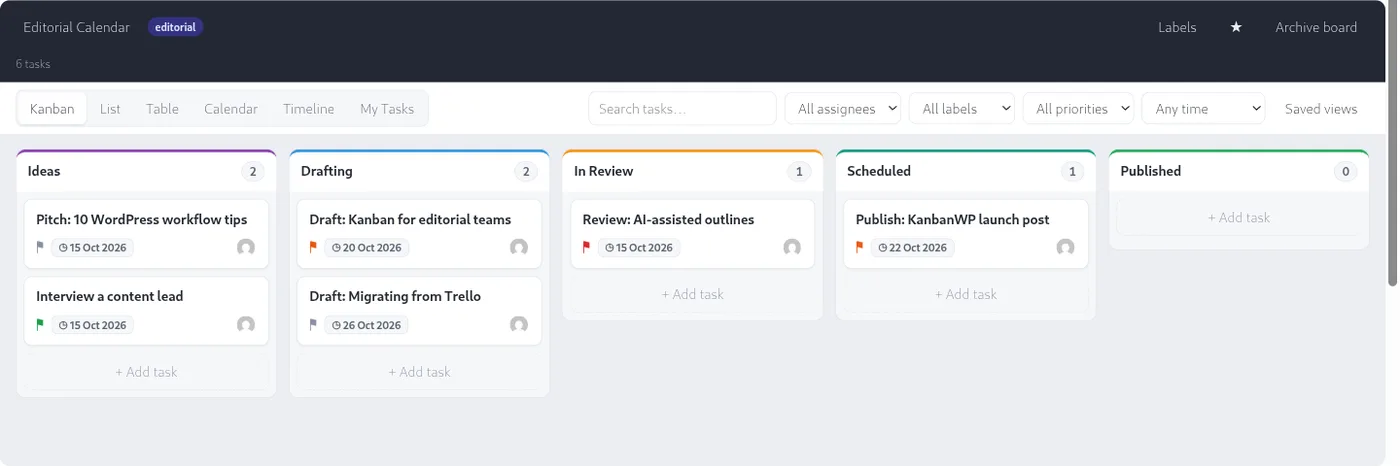
KanbanWP is a free GPLv2 plugin that adds kanban boards to the WordPress admin. People sign in with their WordPress accounts, and boards, tasks and comments are stored in your WordPress database. There are no seat fees and no paid plans.
KanbanWP has:
- Unlimited boards, with stages, drag and drop and WIP limits per stage.
- Kanban, List, Table, Calendar, Timeline and My Tasks views, plus swimlanes and saved views.
- Tasks with priorities, due dates, assignees, labels, checklists, attachments and custom fields.
- Board roles (admin, member, viewer and client) and a client portal that hides internal tasks and comments.
- Outgoing webhooks, Slack and Discord notifications, and tasks created from WooCommerce orders.
Fits: teams that already run a WordPress site and want their boards there. Limits: you handle hosting, backups and updates. KanbanWP has no native mobile app, though the board works in a mobile browser.
Moving your boards out of monday.com
monday.com’s support article on exporting to Excel explains how to download a board from the board menu. The export follows the board’s current filters, so clear them first to get every item. You can also include updates and subitems.
The file holds the board’s table, so other board views are not exported. Updates on subitems are not exported either. Plan to set up views and automations again in the new tool.
Most of the tools above can import a spreadsheet. To move a board into KanbanWP:
- Export the board from monday.com to Excel.
- Open the file in a spreadsheet app. Make sure the first row holds the column names, and rename the columns to KanbanWP’s headers:
title,description,stage,priority,assignee,due_date,start_dateandlabels. - Save the sheet as a CSV file.
- In WordPress, go to KanbanWP > Import / Export and upload the file under CSV.
Each row becomes a task, and stage names that do not exist yet are created on the new board. Assignees are matched to WordPress users by username, then by email address. Updates and subitems are not imported. The details are in importing and exporting boards.
Which monday.com alternative fits which team
| Your situation | Tools to compare |
|---|---|
| More than 2 people, no budget | Plaky Free, ClickUp Free, Trello Free |
| Team size between monday.com’s seat groups | Plaky, Trello, Asana, ClickUp (billed per user), Basecamp (billed per account) |
| Charts or time tracking without monday.com Pro | Plaky Free (charts), ClickUp Free (time tracking) |
| Projects with deadlines and dependencies | Asana, Wrike, Smartsheet |
| Structured records in a table | Airtable, Baserow |
| Docs and tasks in one place | Notion, ClickUp |
| Client and agency work | Teamwork.com, KanbanWP |
| Data on your own server | OpenProject, Baserow, KanbanWP |
For a list limited to free tools, see best free kanban board software in 2027. To start a KanbanWP board from a ready layout, see the kanban board templates, and for a full feature list, see features.
Frequently asked questions
What is the best free alternative to monday.com?
Among hosted tools, Plaky Free and ClickUp Free Forever allow unlimited users, and Trello Free allows 10 collaborators per Workspace. If you can host software yourself, OpenProject Community and KanbanWP are free with no user limits.
Is monday.com free?
Yes, for very small teams. As of October 2026, monday.com's Free plan allows up to 2 seats, 3 boards and 3 docs. Paid plans start at $9 per seat per month billed annually, with a 3-seat minimum.
Which alternative is most similar to monday.com?
Plaky and Airtable store work as rows of items with a field for each detail, as monday.com does. Plaky's Free plan allows unlimited users. Airtable's Free plan allows 5 editors and 1,000 records per base. If you want to host the software yourself, Baserow has a similar grid.
Is Asana better than monday.com?
Asana suits teams that plan projects with dependencies and deadlines. monday.com suits teams that track many kinds of records on table-style boards. Both free plans stop at two people. Asana Starter costs $10.99 per user per month billed annually, between monday.com Basic at $9 and Standard at $12.
Is there an open source alternative to monday.com?
Yes. OpenProject Community is released under GPL-3.0, Baserow's core is MIT-licensed, and KanbanWP is a GPLv2 WordPress plugin. You host each of them yourself.