A client onboarding checklist lists every step between a signed deal and the first piece of work your client approves. It covers paperwork, payment, the information you need from the client, the kickoff call and the first weeks of delivery. Below is a checklist you can copy, with notes on scaling it for small and large clients and on running it on a kanban board so no client stalls halfway through.
The checklist is written for agencies and freelancers who do project or retainer work, such as design, development, marketing or content.
What a client onboarding checklist is
Jet Admin defines the checklist as one that “lists every step between a signed contract and the moment a new client sees results”, with an owner and a deadline for each step. Use that definition to test your own list. If a step has no owner, nobody does it. If it has no deadline, it slips until the client asks about it.
Onboarding matters because it is the first part of the work the client sees. Bain & Company has argued that “by increasing retention by as little as 5 per cent, profits can be boosted by as much as 95 per cent”. A client who starts with missing logins, an unclear timeline and a late first invoice has reasons to leave before you have delivered anything.
The client onboarding checklist
Copy the five stages below into your project tool, a document or a card checklist, then delete what does not apply to your work.
1. Before kickoff
- Signed contract or proposal, with a statement of work that lists what is included and what is not.
- NDA signed, if the client asks for one.
- Deposit or first invoice sent, and the client’s billing contact and payment process recorded.
- Tax forms exchanged where they are required, such as a Form W-9 for a US freelancer.
- Handoff notes from sales: what was promised, what is out of scope, who decides, and any concerns the client raised.
- Team assigned, with one named main contact for the client.
- Client set up in your tools: a project or board, a shared folder, and a record in your CRM or invoicing app.
Rock’s checklist puts the contract and any deposit first, and does not schedule the kickoff until both are done. This order protects you if the client changes their mind in the first week.
The IRS describes Form W-9 as the form you use “to provide your correct Taxpayer Identification Number” to someone who has to report payments to the IRS. Zapier’s checklist lists it among the steps to get paid, along with recording your agreed rates and collecting any upfront deposit.
2. Welcome and intake
- Welcome email sent, with the team, the timeline, payment terms, how to reach you and the next step.
- Onboarding questionnaire sent (see the questions below).
- Brand assets and documents requested in one list: logos, brand guidelines, past reports, existing copy.
- Access requested to every account you need, such as the website, hosting, analytics and ad accounts.
- Credentials received through a password manager, not by email.
- Access tested on each account.
- A reminder date set for anything still missing.
Zapier’s welcome step covers the process, timelines and deliverables, an introduction to your team and your payment terms, plus an intake form for contacts, goals, deadlines, brand assets and platform access. Automattic’s agency checklist advises sharing credentials through password managers rather than email and setting role-based permissions.
Onboarding stalls when the client has not sent what you asked for. Jet Admin’s checklist chases missing items automatically after three days. A fixed reminder date does the same job if you send reminders by hand.
3. Kickoff call
- Agenda sent at least 24 hours before the call.
- Each person introduced by their role on this project.
- The client’s goals restated and confirmed.
- Success measures agreed and written down.
- Communication plan agreed: channel, update day, expected response time, and who to contact about a problem.
- One person on the client side named to approve each deliverable.
- Timeline walked through, including the dates you need things from the client.
- Summary sent within 24 hours, with decisions, owners and next steps.
Zoomforth’s checklist asks for the agenda at least 24 hours ahead and the written summary within 24 hours after the call. It also asks you to raise constraints during the call, such as blackout dates and dependencies on the client’s own team.
4. Setup and first delivery
- Project plan shared with milestones, deliverables and due dates.
- Regular check-ins booked for the length of the onboarding.
- A small first deliverable chosen that the client will notice.
- Every deliverable checked internally before the client sees it.
- Client approval recorded for each deliverable.
Automattic and Jet Admin both recommend an early quick win. Jet Admin suggests a tangible result in the first two weeks. Automattic recommends a standard QA checklist with more than one reviewer for each deliverable, and documented sign-off at each phase.
5. First 30 days
- Check-in held in week two.
- 30-day review held against the success measures agreed at kickoff.
- Feedback survey sent.
- Handover from onboarding to ongoing account work confirmed.
- Lessons added to your onboarding template.
Automattic suggests sending the survey within one or two weeks of finishing onboarding, with a mix of rating, multiple-choice and open questions. Zoomforth and Jet Admin both end with the same step: write down what went wrong and update the checklist before the next client.
Scale the checklist to the client
A one-off logo project and a large monthly retainer need different amounts of onboarding. Rock keeps the same steps in the same order for every client and changes only how deep each one goes. Its three tiers:
| Tier | Fits | Questionnaire | Kickoff |
|---|---|---|---|
| Essential | Retainer under $2K a month or project under $5K | 5 questions | 30 minutes |
| Standard | Retainer $2K to $10K a month or project $5K to $25K | 15 questions | 60 minutes |
| Premium | Retainer $10K+ a month or a flagship project | 25+ questions | 90 minutes |
Rock adds two rules. Skip the Essential tier when the client has a procurement or legal review, and move a client up a tier when several people on their side have a say.
For a freelancer with small clients, the Essential version is often enough: a contract and deposit, a welcome email, a short questionnaire and one kickoff call. Keep the 30-day review, because it costs one short call.
How long client onboarding takes
The published checklists give different answers.
- Jet Admin uses day ranges: before kickoff on days 0 to 3, information collection on days 1 to 7, kickoff on days 5 to 10, setup and first delivery on days 10 to 30, and a review on day 30. It calls these “planning examples” and does not offer them as a benchmark.
- Rock targets a kickoff by day 10 to 14 after the contract.
- Zoomforth calls 2 to 4 weeks standard for low-complexity software and 60 to 90 days common for enterprise implementations.
For agency and freelance work, a kickoff within two weeks and a review at day 30 is a reasonable plan. Track the items you are waiting for from the client separately from your own tasks, so you can see which side is holding up the start.
Questions for the onboarding questionnaire
Ask only what you need to start the work. Fill in what you already learned during sales and ask the client to confirm it, as Automattic suggests.
- What does this project need to achieve, and how will you measure it?
- Who is the audience?
- Who is the main contact, and who approves the work?
- What brand assets, guidelines and past work can you share?
- Which tools and accounts will we need access to?
- What deadlines or blackout dates should we plan around?
- How do you prefer to receive updates?
- What did you like and dislike about agencies or freelancers you worked with before?
Rock’s questionnaire for its smallest tier has five questions: goal, top constraint, current state, decision maker and communication channel. Its largest tier adds the technology stack, stakeholders, security or compliance needs, and experience with past vendors.
Run onboarding on a kanban board
A checklist in a document works for one client. With three or four clients onboarding at once, you need to see where each one stands. A kanban board does this with one card per client.
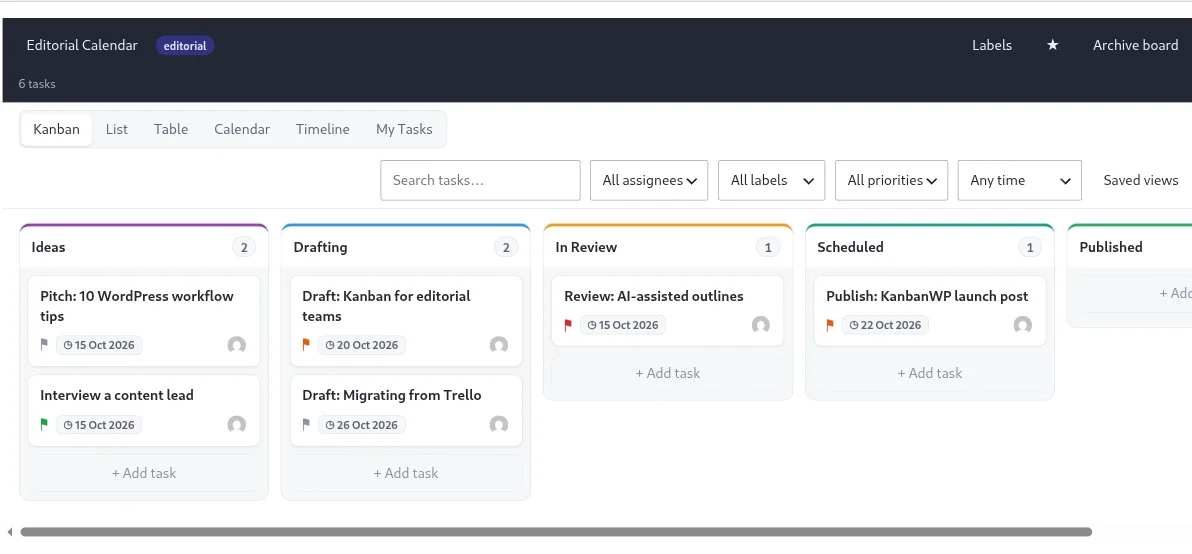
A simple onboarding board has one stage for each part of the checklist:
- Contract and payment
- Intake
- Waiting on client
- Kickoff
- First delivery
- 30-day review
- Done
Each new client gets a card, and the card’s checklist holds that client’s onboarding steps. Move the card when the steps for its stage are done. A card in Waiting on client shows that the next move is the client’s. When that stage fills up, you know to chase clients before you plan new work.
In KanbanWP, each task has one checklist that shows progress such as 2/5, and you can attach the signed contract or brand files from the WordPress media library. For a large client, you can give each onboarding its own board instead, with one card per stage and the steps in each card’s checklist. Build that board once and duplicate it for every new client. The copy keeps the stages, labels, WIP limits and every task with its checklist.
You can also give the client a view of their own project. The client portal shows a board on a page of your site to a logged-in client with the Client role. A client can read and comment, but cannot move or edit tasks. Tick Internal only on a task, or Internal on a comment, to keep pricing notes and team discussion off the client’s screen. The Client board template starts with Backlog, In Progress, In Review, Approved and Done, which fits the delivery work after onboarding.
Common onboarding mistakes
- Starting work before the contract and deposit are in. Rock schedules the kickoff only after both are in.
- Treating the kickoff as day one. Rock lists this as an anti-pattern. Most of the setup work happens before the call.
- Leaving out the uncomfortable terms. Rock names revision limits, change orders and kill fees; agree on them in writing before the work starts. Our guide to dealing with difficult clients covers a change rule for new requests.
- Asking for information in several emails. Jet Admin recommends one questionnaire and one document list.
- Sending passwords by email. Use a password manager, as Automattic and Jet Admin both advise.
- Using the same heavy process for every client. Rock warns against over-engineering small retainers.
- Never updating the checklist. Add each lesson to the template after the 30-day review.
Frequently asked questions
What should a client onboarding checklist include?
It should cover every step from the signed contract to the first approved deliverable: paperwork and payment, a welcome email and questionnaire, access to the client's accounts, a kickoff call, a project plan, and a review after about 30 days. Each item needs an owner and a due date.
How long should client onboarding take?
It depends on the work. Jet Admin's example schedule holds the kickoff in the first week or two and a review at day 30. Zoomforth calls 2 to 4 weeks standard for low-complexity software and 60 to 90 days common for enterprise projects. Jet Admin calls its own numbers planning examples.
Who is responsible for client onboarding?
Name one person on your side as the client's main contact for onboarding, usually the account manager or, for a freelancer, yourself. Each checklist item still gets its own owner, so sales can own the handoff notes and a delivery lead can own the first deliverable.
What questions should a client onboarding questionnaire ask?
Ask for the client's goals and how they will measure success, their audience, brand assets, existing tools, the contacts you will work with, and the person who approves work. Ask only what you need to start, and fill in what you already know from the sales calls so the client can confirm it.
Should a small client get the same onboarding as a large one?
The steps can stay in the same order, but their depth should change. Rock's checklist uses a five-question questionnaire and a 30-minute kickoff for small retainers, and 25 or more questions and a 90-minute kickoff for its largest tier.
Can I run client onboarding on a kanban board?
Yes. Make a board with one card per new client and stages for each phase of onboarding, and put the steps for that phase in the card's checklist. A Waiting on client stage shows which onboardings are stuck on the client's side.