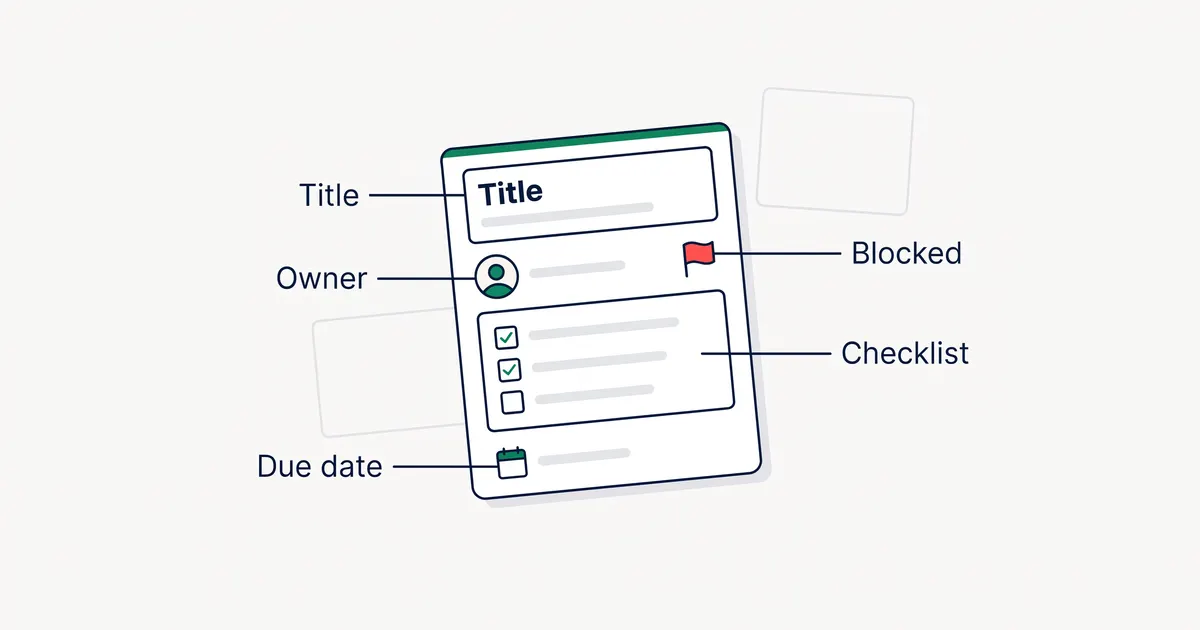
A kanban card is a visual representation of one work item. That is how the Kanban University glossary defines it, and it adds that a card may also be called a ticket. This guide covers what to put on a card, how to show blockers and urgency, examples for common teams, a template you can copy, and how cards work in manufacturing, where the term started.
What a kanban card does
Each card stands for one piece of work, such as a bug fix, a blog post, a client request or a sales lead. The card sits in the column for the stage the work is in, and someone moves it to the next column when the work moves on. Anyone who looks at the board can see what is in progress, who is doing it and what is stuck.
The Kanban Guide (May 2025) does not mention cards at all. It calls the units of work “work items” and leaves the way you show them up to the team. The Kanban University glossary describes a kanban board as a visual display of cards that represent the work items.
What to put on a kanban card
Most teams split a card into two parts. The face is what you see on the board. The details are what you see when you pick up a physical card or open a digital one. Put a field on the face only if it changes what someone does next.
| Field | Where it goes | What it tells the team |
|---|---|---|
| Title | Face | What the work is, in a few words that start with a verb, such as “Fix checkout tax rounding”. |
| Owner | Face | Who is doing the work now. One name, or initials on a paper card. |
| Due date | Face, if there is one | When the work must be done. Leave it empty for work with no real deadline. |
| Priority or class of service | Face | How urgent the work is, usually shown as a color or a flag. |
| Blocker | Face, while it lasts | That the work is waiting, and on what. |
| Type | Face | What kind of work it is: bug, feature, article, request. A colored label works well. |
| ID | Face or details | A number you can use in chat and commit messages. |
| Description | Details | The context and the expected result. |
| Acceptance criteria | Details | How you will know the work is done. |
| Checklist | Details | Small steps that don’t need their own card. |
| Links and files | Details | The brief, the design, the bug report, the draft. |
| Comments | Details | Questions and decisions, kept with the work. |
A sticky note has room for only a few of these fields. Pick the title, the owner and one or two more, and keep the rest in a shared document or ticket that the card points to.
How to show a blocked card
The Kanban University glossary defines a blocker as something that impedes the flow of a work item, and says the blockage can be partial or complete. Leave a blocked card in its current column. If you move it to a separate “Blocked” column, the board no longer shows which stage the work stopped in.
- On a physical board, put a red or pink sticky note on the card and write on it what the card is waiting for and since when.
- In software, use the blocker field if the tool has one, or a “Blocked” label. Also record which card the blocked work depends on, so the owner of that card knows someone is waiting.
Review blocked cards first in each daily team meeting (stand-up), before cards that are moving.
Class of service and card type
Card type and class of service are different ideas, although some guides list both as “card types”. Card type says what the work is, and class of service says how urgently the team treats it.
Card type (work item type)
The glossary defines a work item type as a group of work items that behave alike and follow the same workflow. Its examples include information requests, campaigns, incidents and software bugs. Card type tells you what the work is. Common types:
- Feature or user story
- Bug or defect
- Content piece (article, video, newsletter)
- Client request
- Internal improvement or maintenance
Show the type with a label color, so the board shows the mix of work at a glance.
Class of service
A class of service sets how a work item is treated, through a set of policies. The glossary says the choice can reflect value, risk or cost of delay, and it names four common archetypes:
| Class of service | When the impact of delay is | Example card |
|---|---|---|
| Expedite | High and immediate | The checkout page is down. |
| Fixed date | At a specific date | Update the privacy policy before a law takes effect. |
| Standard | Typical of current conditions | Add a filter to the reports page. |
| Intangible | Unknown | Upgrade a library that still works. |
Each class of service needs a written rule. For example, an Expedite card can skip the queue, and only one Expedite card may be on the board at a time. Fixed-date cards start early enough to finish before the date.
Kanban card examples
These examples show which fields matter for different kinds of work. The face fields are what you would write on the card itself.
Software bug
- Face: “Fix tax rounding on checkout”, owner, type Bug, priority High.
- Details: steps to reproduce, expected and actual result, browser and version, link to the error log.
Content piece
- Face: “Write the kanban cards guide”, writer, type Article, publish date.
- Details: target keyword, outline, brief, editor, link to the draft.
Client request
- Face: “Add team photos to About page”, owner, client name, due date.
- Details: the client’s message, files they sent, what was agreed, approval notes.
Sales lead
- Face: company name, owner, deal stage label (Hot, Warm or Cold), next follow-up date.
- Details: contact person, what they asked for, quoted price, call notes.
Operations request
- Face: “New laptop for Sam”, owner, class of service, needed-by date.
- Details: requester, budget code, approval, delivery address.
Kanban card template
Copy this into a card description, a printed card or a text file, and delete the lines you don’t need.
Title:        [Verb + object, for example "Fix tax rounding on checkout"]
Owner:        [One person]
Type:         [Bug / Feature / Article / Request / Maintenance]
Class:        [Expedite / Fixed date / Standard / Intangible]
Due date:     [Only if there is a real deadline]
Blocked by:   [Card or person it waits for, and since when]

Why:          [One or two sentences of context]
Done when:    [Acceptance criteria]
Checklist:    [ ] Step 1  [ ] Step 2  [ ] Step 3
Links:        [Brief, design, bug report, draft]
For whole boards with columns and labels already set, see our kanban board templates.
What to leave off a card
A card that holds everything is hard to read from across the room or on a crowded screen. Keep these off the face:
- Long descriptions. Put them in the details or a linked document.
- More than one owner. Give the card one owner and list any helpers in the details.
- Several labels for the same idea, such as both a color and the word “Urgent”.
- Status words such as “In progress”. The column already shows the status.
- Deadlines that are only targets. Use the due date only when the work has a real deadline.
Physical vs digital kanban cards
Physical cards are sticky notes, index cards or printed cards on a whiteboard or a wall. Teams in one room can see the board without opening anything, and moving a card by hand is quick. Shops also sell magnetic cards and card holders for whiteboards, and plastic sleeves that protect printed cards.
Digital cards live in kanban software. They suit teams that work in more than one place. A digital card can hold files, comments and a history of every move, so the software can report how long cards take to finish. The drawback is that people have to open the board to see the work.
| Physical cards | Digital cards | |
|---|---|---|
| Space for details | A few fields | Unlimited, in the card details |
| Remote team | Hard | Yes |
| History of moves | No, unless someone writes it down | Kept automatically in most tools |
| Cycle time reports | Counted by hand | Calculated by the tool |
| Setup | A wall, a pen and cards | An account or an install |
Some teams use both: a physical board for the daily stand-up and a digital tool as the record.
Kanban cards in manufacturing
Many kanban cards sold online are for factories. In manufacturing, a kanban card is not a task. The Lean Enterprise Institute defines a kanban as a signaling device that authorizes and instructs production or withdrawal of items in a pull system. The word kanban is Japanese for “signboard” (Wikipedia).
The Lean Enterprise Institute describes these types:
- Production kanban tell an earlier (upstream) process which products to make, and how many, for the next (downstream) process.
- Signal kanban are a kind of production kanban. They trigger production of a batch when stock falls to a minimum number of containers.
- Withdrawal kanban authorize moving parts to a downstream process. They include interprocess kanban, used inside the plant, and supplier kanban, sent to outside suppliers.
According to the Lean Enterprise Institute, a manufacturing card usually carries:
- The part name and part number
- The supplier or the internal process that makes the part
- The number of units per container
- Where the parts are stored
- Where the parts are used
- Sometimes a barcode, for tracking or automatic invoicing
Electronic kanban, or e-kanban, replaces the paper cards with barcodes and electronic messages (Wikipedia).
Toyota’s 75-year company history says Toyota introduced a “supermarket method” in 1954. In that method, each process acts as a customer that takes only the parts it needs from the process before it. The supermarket method became the kanban system when Toyota added a production instruction sheet. Software teams later used the same idea of a visible card that signals work, without the fixed quantities and containers.
Kanban cards in KanbanWP
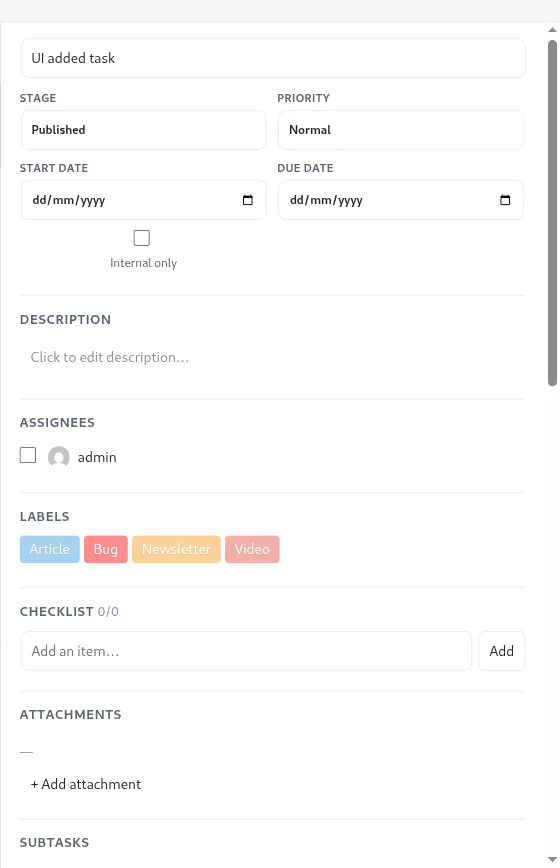
KanbanWP is our free kanban plugin for WordPress, and each task on a board is a card. The card face shows:
- The title, with colored label chips above it
- A priority flag (low, normal, high or urgent), colored for high and urgent
- The due date, highlighted when it is today or overdue
- Avatars of the assignees
- Counts of comments, checklist items done, subtasks and blockers
- A cover image, if you set one, and a marker when the task is linked to a WordPress post
Opening a card shows the description, start and due dates, checklist, attachments from the media library, comments with @mentions, and subtasks and a “Blocked by” list. Each task also has a number, shown as # plus digits in the task panel. Custom fields hold extra details as plain-text name and value pairs, such as a client name or an order number.
To show a class of service, use the priority flag or create labels named Expedite, Fixed date, Standard and Intangible. Blockers in KanbanWP are informational. The plugin doesn’t stop you moving a blocked task, and the card shows the number of tasks blocking it. The task best practices page covers owners, real due dates, priority and blockers.
Frequently asked questions
What is a kanban card?
A kanban card is a visual representation of one work item, such as a bug, an article or a client request. It moves from column to column on a kanban board as the work moves through your process. The Kanban University glossary says a card may also be called a ticket.
What information should be on a kanban card?
The face of the card needs a short title, the owner, and any due date, priority or blocker that changes what someone does next. Longer details, such as the description, acceptance criteria, checklist and files, belong in the card details.
What are the four classes of service in kanban?
The Kanban University glossary names four common classes of service: Expedite, Fixed date, Standard and Intangible. The classes differ in the impact of delay. For Expedite it is high and immediate, for Fixed date it comes at a specific date, for Standard it is typical, and for Intangible it is unknown.
How do you show a blocked kanban card?
Keep the card in its column and mark it. On a physical board, add a red sticky note that says what the card is waiting for and since when. In software, use the tool's blocker field or a Blocked label.
What are kanban cards in manufacturing?
In manufacturing, a kanban card is a signal to make or move a set quantity of parts. Production kanban tell a process what and how many to make, and withdrawal kanban authorize moving parts to the next process. The card usually carries the part name and number, the quantity per container, and where the parts are stored and used.
Are digital kanban cards better than physical ones?
Physical cards work well for one team in one room. Digital cards suit teams in more than one place, and most tools keep a history of every move, so the software can report how long cards take to finish.