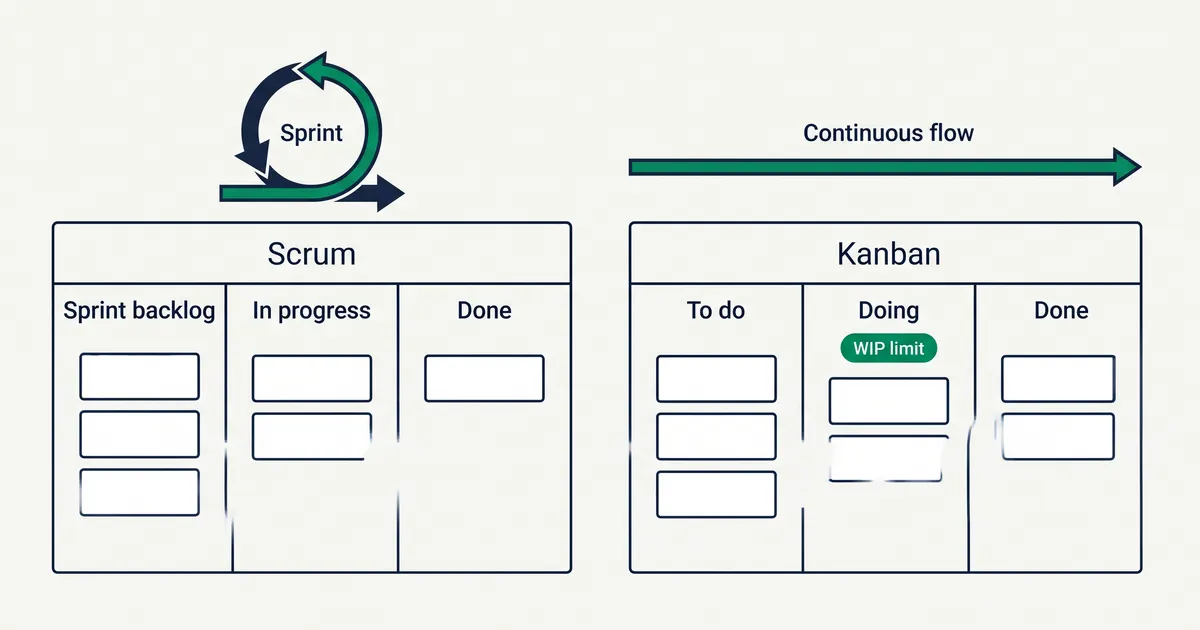
Kanban and Scrum are both ways for a team to manage its work, but they divide time differently. Scrum works in fixed-length Sprints with set accountabilities and events. Kanban has no iterations or required roles, and it controls how much work is in progress at once. This article compares the two using their official guides, shows how a Scrum board differs from a kanban board, and explains Scrumban and when each approach fits.
The short answer
- Scrum plans a Sprint of one month or less, commits to a Sprint Goal and inspects the result at the end. It defines three accountabilities and five events.
- Kanban shows the workflow on a board and limits the number of items in progress. New work starts when there is capacity, and there are no Sprints or required roles.
- The two can be combined. A Scrum team can use kanban practices inside its Sprints, and Scrumban is a known mix of the two.
If your work arrives continuously and priorities change every week, start with Kanban. If your team builds one product and can plan a few weeks ahead with a stable goal, Scrum gives you a structure for that.
What Scrum is
The Scrum Guide, written by Ken Schwaber and Jeff Sutherland, defines Scrum as “a lightweight framework that helps people, teams and organizations generate value.” Schwaber and Sutherland first presented Scrum in 1995 and wrote the first Scrum Guide in 2010. The current version is from November 2020.
The guide defines these parts:
- One Scrum Team of a Product Owner, a Scrum Master and Developers, “typically 10 or fewer people.” The team is cross-functional and self-managing.
- Three accountabilities: the Product Owner, the Scrum Master and the Developers. The 2020 guide uses the word accountabilities, not roles.
- Five events: the Sprint, Sprint Planning, the Daily Scrum, the Sprint Review and the Sprint Retrospective.
- Three artifacts, each with a commitment: the Product Backlog (Product Goal), the Sprint Backlog (Sprint Goal) and the Increment (Definition of Done).
Sprints are “fixed length events of one month or less,” and a new Sprint starts as soon as the previous one ends. The guide calls Scrum “purposefully incomplete.” It says teams can use various processes, techniques and methods within the framework. Scrumban, covered below, is a Scrum setup with kanban practices added.
What Kanban is
Two different guides describe Kanban, and they differ in scope.
The Kanban Guide by John Coleman and Daniel Vacanti (version 2025.5, May 2025) defines Kanban as “a strategy for optimizing the flow of value through a process.” It names three practices:
- Defining and visualizing a workflow.
- Actively managing items in a workflow.
- Improving a workflow.
The team writes down its Definition of Workflow. This includes the work items, where they start and finish, the states in between, how work in progress is controlled, the rules for moving items, and a service level expectation, which is a forecast of how long an item should take. The Kanban Guide defines no roles and no iterations. It calls everyone who takes part “Kanban system members.”
Kanban University’s guide to the Kanban Method describes a wider management method that “should be applied to an existing process or way of working.” Its first principle is “start with what you do now,” and it lists six general practices: visualize, limit work in progress, manage flow, make policies explicit, implement feedback loops, and improve collaboratively and evolve experimentally.
For the parts of a board and where the kanban system came from, see what is a kanban board.
Differences between Kanban and Scrum
| Scrum | Kanban | |
|---|---|---|
| Time | Sprints of one month or less | Continuous flow, no iterations |
| People | Product Owner, Scrum Master, Developers | No required roles |
| Meetings | Five events with timeboxes | None required; regular reviews are common |
| Limit on work | The Sprint Goal and the work selected in Sprint Planning | An explicit limit on work in progress |
| Changes | Sprint Goal stays fixed; scope can be renegotiated | New work enters when a slot opens |
| Board | Optional; often used for the Sprint Backlog | The central tool |
| Measures | Not prescribed; forecasting practices are optional | WIP, throughput, work item age, cycle time |
Kanban vs Sprints
The main difference between Kanban and a Sprint is how time is divided. In Scrum, the team selects work in Sprint Planning and aims to deliver an Increment that meets the Definition of Done by the end of the Sprint. Sprint Planning answers three questions: why the Sprint is valuable, what can be done, and how the chosen work will get done.
Kanban has no start or end date for a batch of work. Each item starts when the team has capacity and finishes when it is done. A team can still release on a schedule, but the flow of work does not stop and restart.
Accountabilities vs no roles
Scrum names who is accountable for what. The Product Owner orders the Product Backlog and is the only person who can cancel a Sprint. The Scrum Master is accountable for the team’s effectiveness, and the Developers create the Increment.
The Kanban Guide defines no roles, so you start with the people and job titles you already have.
Events vs cadences
Scrum’s events have maximum lengths. For a one-month Sprint, Sprint Planning is at most eight hours, the Sprint Review four hours and the Sprint Retrospective three hours. The Daily Scrum is 15 minutes. Shorter Sprints usually have shorter events.
The Kanban Guide calls a regular review of active items “a common practice.” It also says there is no requirement to wait for a formal meeting to change the workflow. Kanban University suggests regular meetings, which it calls cadences, and recommends adding them gradually.
How each approach limits work
Both approaches stop a team from taking on too much, but in different ways. Scrum limits work through Sprint Planning, where the Developers select the items they forecast they can finish in the Sprint.
Kanban limits work in progress directly. A column such as Doing gets a number, and the team does not pull a new item into it while the column is full. The Kanban Guide says the system should “operate neither above nor below the agreed upon control,” so the number of items in progress stays at the agreed level.
Changes in the middle of the work
The Scrum Guide does not freeze the Sprint completely. It does not allow changes that would endanger the Sprint Goal, but scope “may be clarified and renegotiated with the Product Owner as more is learned.” If the Sprint Goal becomes obsolete, the Product Owner can cancel the Sprint.
In Kanban, an urgent item goes to the top of the queue and enters the board when a slot opens. Kanban has no Sprint Goal, so a change in priority does not break a team commitment.
Metrics
The Kanban Guide defines four flow measures:
- WIP: the number of work items started but not finished.
- Throughput: the number of work items finished per unit of time.
- Work item age: the time between when an item started and today.
- Cycle time: the time between when an item started and when it finished.
The Scrum Guide does not prescribe metrics. It mentions burn-downs, burn-ups and cumulative flows only as examples of ways to forecast progress. Many Scrum teams use velocity and story points, but neither appears in the Scrum Guide.
Scrum board vs kanban board
Neither guide requires a particular board layout, but the boards teams use for each approach look different.
A Scrum board shows the Sprint Backlog: the Sprint Goal, the items selected for the Sprint and the plan to deliver them. A simple Scrum board has three columns:
- To Do
- In Progress
- Done
Teams usually clear the board at the end of each Sprint. The Scrum Guide says an item that does not meet the Definition of Done returns to the Product Backlog, and the next Sprint Planning selects new work.
A kanban board shows the whole workflow and stays in use without a reset. It usually has more columns, one per real step, and a WIP limit on the busy ones. A kanban board for a small web team might look like this:
- Requested
- Ready (limit 5)
- Doing (limit 3)
- Review (limit 2)
- Done
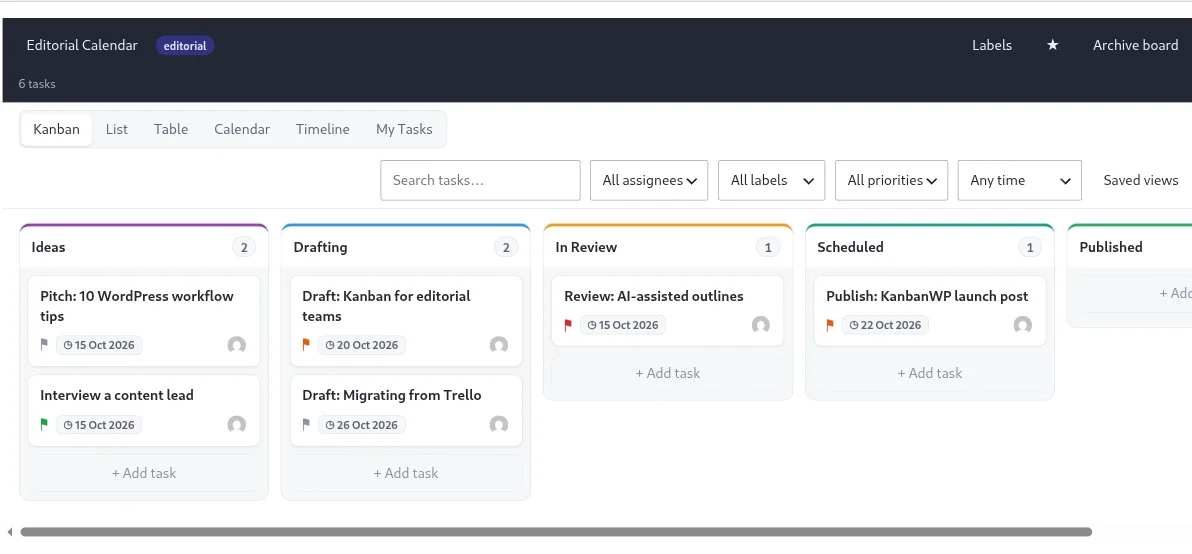
The practical difference between a kanban board and a Scrum board comes down to three points:
- Scope. A Scrum board holds one Sprint’s work. A kanban board holds all work in the workflow.
- Limits. A Scrum board is limited by what was selected in Sprint Planning. A kanban board has a number on each busy column.
- Lifetime. A Scrum board is usually cleared each Sprint. A kanban board runs continuously.
Claims to check in other comparisons
Many kanban vs Scrum articles describe Scrum in ways the 2020 Scrum Guide does not. These are the common ones:
- “Sprints last one to four weeks” or “two weeks.” The Scrum Guide says one month or less and sets no shorter minimum.
- “Scrum teams have at most nine people.” The Scrum Guide says “typically 10 or fewer.”
- “Scope is fixed during a Sprint.” The Sprint Goal is fixed, but scope can be clarified and renegotiated with the Product Owner.
- “Scrum uses velocity and story points.” Many teams do, but the Scrum Guide does not mention either.
- “Kanban came out of the Agile movement.” Kanban comes from Toyota’s production system, which is older than the Agile Manifesto. See where the kanban system came from.
Scrumban
Scrumban is a mix of Scrum and Kanban. Corey Ladas described it in his 2008 book Scrumban, and Agile Alliance publishes an excerpt. Ladas started from a Scrum team and added kanban practices one at a time:
- A team-wide limit on work in progress, for example four or five items for three people.
- A small, limited ready queue between the backlog and active work.
- Pulling the next item from the ready queue when a person finishes one.
- Assigning an owner to a task only when someone starts it.
- A cumulative flow diagram to track flow and lead time.
In a later step, Ladas stops planning on a fixed schedule. The team plans when the queue of waiting work falls to a set level, called an order point, instead of on a fixed date.
Scrumban suits a Scrum team that wants WIP limits and smoother flow, or a team moving from Scrum to Kanban in steps.
When to use Kanban and when to use Scrum
Use Kanban when:
- Work arrives continuously, as in support, maintenance, client requests or editorial work.
- Priorities change often, and the team cannot protect a goal for a whole Sprint.
- The team is very small. Mountain Goat Software notes that a team smaller than a two-pizza team may not gain enough from Scrum’s events to justify them.
- You want to start without new job titles or meetings and improve the process in small steps.
Use Scrum when:
- One team builds one product and can plan a few weeks ahead.
- You want a fixed rhythm of planning, review and retrospective.
- Stakeholders want to see a usable Increment at regular intervals.
- The team can have a Product Owner and a Scrum Master.
Use Scrumban when a Scrum team keeps its Sprints but has too much work in progress, or when it wants to move toward Kanban gradually.
Kanban also works outside software. For boards built for other kinds of work, see these kanban examples.
Running a kanban board in WordPress
KanbanWP is our free WordPress plugin. It is a kanban tool and has no Sprint feature: there is no Sprint start or end date, no story points and no burndown chart. It supports two kanban practices from this article, WIP limits and flow measures:
- WIP limits. Each stage can have a WIP limit, set from the ⋯ menu in the stage header. The stage shows its count against the limit and a warning when it goes over, but it does not block a move.
- Flow. The Reports screen shows tasks per stage, average cycle time and a 30-day cumulative flow chart. A task counts as completed when it enters the board’s last stage. Cycle time is measured from when the task was created, not from when work started.
- A board per Sprint. A Scrum team can still keep its Sprint Backlog on a board. You can duplicate a board to copy its stages, WIP limits and labels, or add a label for each Sprint and filter by it.
To start, create a board from one of the kanban board templates and follow your first board.
Frequently asked questions
What is the main difference between Kanban and Scrum?
Scrum organizes work in Sprints, fixed-length events of one month or less, with three accountabilities and five events. Kanban has no iterations and no required roles. Work flows continuously, and the team controls how many items are in progress at once.
Does Kanban have Sprints?
No. The Kanban Guide defines no iterations, so work items start whenever the team has capacity. Some teams review their board on a regular schedule, but Kanban does not require it.
What is the difference between a Scrum board and a kanban board?
A Scrum board shows the Sprint Backlog, the work selected for the current Sprint, and teams usually clear it at the end of each Sprint. A kanban board shows the whole workflow continuously and puts a work-in-progress limit on its busy columns.
What is Scrumban?
Scrumban is a mix of Scrum and Kanban that Corey Ladas described in his 2008 book Scrumban. It starts from a Scrum team and adds kanban practices such as a team-wide work-in-progress limit, a ready queue and pulling the next item when a person finishes one.
Is Kanban better than Scrum?
Neither is better in general. Kanban suits work that arrives continuously and changes priority often, such as support, and very small teams. Scrum suits a team that builds one product and can plan a few weeks ahead with a stable Sprint Goal.