A premortem is a short meeting in which a team imagines that its project has already failed and then explains why. Some teams call it a premortem analysis. This guide explains where the method comes from, how a pre mortem differs from a postmortem and a risk register, and how to run one step by step. It ends with a template you can copy, a worked example and a way to track the risks as tasks on a kanban board.
What is a premortem?
Psychologist Gary Klein described the method in “Performing a Project Premortem”, published in the September 2007 issue of Harvard Business Review. In his words, “team members assume that the project they are planning has just failed” and then “generate plausible reasons for its demise.”
The name comes from the medical postmortem, which tells doctors why a patient died. A postmortem helps everyone except the patient. A premortem takes place at the start of a project, so the plan can still change.
A normal review asks the team what might go wrong. A premortem tells the team that the project did go wrong, and asks them to explain it.
Premortem vs postmortem vs risk register
| Premortem | Postmortem | Risk register | |
|---|---|---|---|
| When | Before work starts | After a project or incident ends | Throughout the project |
| Question | “It failed. Why?” | “What went wrong, and why?” | “What could go wrong, how likely is it, and how bad would it be?” |
| Input | The plan and the team’s experience | What really happened | Risks collected from many sources |
| Output | A list of failure reasons and changes to the plan | Lessons and follow-up actions | A tracked list of risks with owners and ratings |
| Typical length | 20 to 60 minutes | One or more meetings and a written report | Ongoing |
A postmortem studies real events. Google’s Site Reliability Engineering book describes a postmortem as a written record of an incident. The record covers the impact, the actions taken, the root causes and the follow-up actions that prevent a repeat. A pre mortem has no real events to study, so it draws on what the team expects to happen.
A risk register is a document, not a meeting. Many teams use a premortem to fill a risk register at the start of a project, and then review the register during the work.
Why a premortem works
Prospective hindsight
Klein built the premortem on a 1989 study by Deborah Mitchell, Jay Russo and Nancy Pennington, “Back to the future: Temporal perspective in the explanation of events”, in the Journal of Behavioral Decision Making. The study tested “prospective hindsight”, which its abstract describes as “generating an explanation for a future event as if it had already happened.”
The abstract reports that setting the event in the past or the future made little difference. What mattered was certainty. When people were told an outcome had definitely happened, their explanations were longer and were written in the past tense. A larger share of their reasons described specific events, which the authors call episodic reasons.
In his HBR article, Klein summarizes the research as finding that prospective hindsight “increases the ability to correctly identify reasons for future outcomes by 30%.” The study’s abstract does not mention a 30% gain in accuracy. It describes longer and more specific explanations. So the abstract supports a narrower claim: a premortem draws out more concrete reasons.
What tests of the method found
In a 2021 Psychology Today post, Klein describes a 2010 study by Veinott, Klein and Wiggins. In that study, 178 college students reviewed a university plan for a flu outbreak. Some students used a premortem, and others used a plain critique or a list of pros and cons. The premortem group showed the largest drop in overconfidence about the plan.
A 2017 master’s thesis by Madeline Peabody at Michigan Technological University ran three more experiments:
- 52 Army cadets planned field exercises in teams. With a premortem, the teams made fewer errors, which the thesis calls fouls. They also showed less fixation, which means sticking to one course of action, and planning took no longer.
- 82 participants reviewed a complex plan. They listed more reasons for failure with a premortem than with a method that asks people to imagine the worst-case scenario.
- The premortem worked for individuals as well as for groups, and groups found more solutions than individuals.
All of these studies used students, cadets and set tasks rather than live company projects, so results at work may differ.
It makes doubts safe to say
Klein gives a second reason, which is social. During planning, people with doubts often stay quiet because they do not want to seem disloyal. In a premortem, the failure is the starting point, so naming a reason for it is the assignment.
Klein lists three more benefits:
- The exercise makes people who are heavily invested in a plan less likely to push ahead and ignore the risks.
- Team members who name a weakness nobody else mentioned feel their experience is valued, and others learn from them.
- The team learns to notice early signs of trouble once the project starts.
How to run a premortem
Klein’s article describes five core steps. The leader briefs the team and announces the failure. People write reasons on their own, the group collects one reason per person in turn, and the project manager reviews the list afterward. The six steps below follow Klein’s order and add two steps of their own: choosing the risks and assigning owners.
Klein’s 2021 post says a premortem “can take as little as 20-30 minutes,” and the Atlassian Team Playbook plans a 60-minute session for 3 to 11 people. The minutes below suit a team of 4 to 10 people and add up to about an hour.
- Brief the team on the plan (10 minutes). Everyone needs the same picture of the goal, the scope, the dates and who does what. A premortem on a plan that people have not seen produces general complaints.
- Announce the failure (2 minutes). Name a date after the deadline and describe the failure plainly. For example: “It is March 31. The new store launched two weeks late and lost money. Why?”
- Write reasons alone (2 to 10 minutes). Each person writes every reason they can think of, in silence. Klein’s 2021 post gives two minutes, and the AHRQ premortem tool for hospital teams gives 10. Klein stresses the reasons people would not normally say aloud. When people write alone, the first person to speak cannot steer what everyone else writes.
- Collect reasons in turn (15 to 20 minutes). Go around the room. Each person reads one reason that has not been said yet, and someone records it where everyone can see it. In Klein’s 2007 article, the project manager reads the first reason. In his 2021 post, the team leader goes first “to set an example of being candid.” Continue until nobody has a new reason left on their list.
- Choose the risks to act on (10 minutes). Group duplicates, then mark the reasons that are both likely and serious. Atlassian gives each person three votes, and AHRQ gives four votes and two minutes to use them. Klein also describes rating each reason for likelihood, impact and ease of prevention.
- Assign an action and an owner (10 minutes). For each chosen risk, decide on a change to the plan, a check during the work, or an early warning sign to watch for. Give each action one owner and a date.
After the meeting, the project manager reviews the full list, as Klein describes, and updates the plan. Keep the reasons that got no votes as well, because they can serve as warning signs.
For a remote team, use a shared document or board for the silent writing step, with each person working in their own section. Then read the reasons out on the call, one per person in turn.
A premortem on your own
You can also run a premortem alone, for example before an exam, a job change or a solo project. Write the goal and a date, assume you missed it, and list every reason. Then pick the two or three likeliest reasons and plan one action for each. Peabody’s thesis found that the premortem worked for individuals, though groups produced more solutions than individuals.
Premortem template
Copy this template into a document or a board description.
PREMORTEM

Project:
Date of session:
Facilitator:
Attendees:

1. The plan in one sentence:

2. The failure scenario
   It is [date after the deadline]. The project has failed.
   What failure looks like: [missed date / over budget / nobody uses it / ...]

3. Reasons for the failure (one per line, all of them)
   -
   -

4. Top risks (likely and serious)
   Risk | Likelihood (1-5) | Impact (1-5) | Action (change, check or warning sign) | Owner | Due

5. Warning signs to watch during the project
   -

6. Date to review this list:
Premortem questions
Use these prompts if the writing step stalls:
- Which assumption in the plan turned out to be false?
- Which person, team or supplier did not deliver, and why?
- What did the customer or user do that we did not expect?
- Which task took far longer than we estimated?
- What changed outside the project, such as a policy, a price or a key person?
- What did we know was a problem but did not say?
- What broke on launch day?
- Who lost interest in the project, and when?
Premortem example: relaunching an online store
A team of five plans to move a small online store to a new theme and a new payment provider before a holiday sale. The launch date is November 15. The team runs a 55-minute premortem with this failure statement: “It is December 1. The relaunch failed, and the holiday sale made less than last year.”
The round of reasons produces 23 items. After grouping and voting, the team picks four:
- Payment provider approval took three weeks. Action: apply for the new account this week. Owner: the store manager.
- Product images looked broken in the new theme. Action: test the 20 best-selling products on a staging site before launch. Owner: the designer.
- Customers could not find their old orders. Action: check that existing accounts and order history carry over, using five real test accounts. Owner: the developer.
- The launch slipped, so the marketing email went out to a broken store. Action: schedule the email only after the launch checklist is complete, and add a link check. Owner: the marketer.
The other 19 reasons go into a risk list that the team reviews every Monday until the sale ends.
Common premortem mistakes
- Running it after the plan is fixed. If nothing in the plan can change, the team has no reason to speak up. Run the premortem while dates and scope are still open.
- Skipping the silent writing step. An open discussion follows the first and most senior speakers. Silent writing gets each person’s own reasons on paper.
- Asking “what could go wrong?” That is a normal risk review. The premortem depends on stating that the failure has already happened.
- Leaving out the quiet people. In one of Klein’s examples, the key reason came from a team member who had been silent during a long kickoff meeting.
- Collecting reasons and taking no action. A list with no owners and no dates changes nothing. Every chosen risk needs an action and one owner.
- Defending the plan during the round. The person who wrote the plan should record reasons, not answer them. Discussion comes in the voting step.
- Letting one person read a whole list. Klein warns against a senior member reading every reason at once. Take one reason per person per turn.
Turn premortem risks into tasks on a kanban board
A risk list in a meeting document is easy to forget once the work starts. If the team plans on a kanban board, put the actions on the same board as the rest of the work. In KanbanWP, a free WordPress plugin, you can set it up like this:
- Create a “Risk” label on the board, and add it to every task that came from the premortem. See labels.
- Make one task per action, with the risk in the description and the action in the title, such as “Apply for the new payment account.” Set the assignee, the due date and a priority of high or urgent for the most serious risks.
- Link actions to the work they protect. In the task’s Blocked by field, add the ID of the task that must finish first. For example, “Schedule the marketing email” can be blocked by “Complete the launch checklist.” See subtasks and dependencies.
- Put checks in a checklist. Steps such as “test the 20 best-selling products” fit as checklist items inside one task. See checklists and attachments.
- Save a risk view. Filter the board by the Risk label and save the filter as a view, so the weekly review takes one click. See saved views.
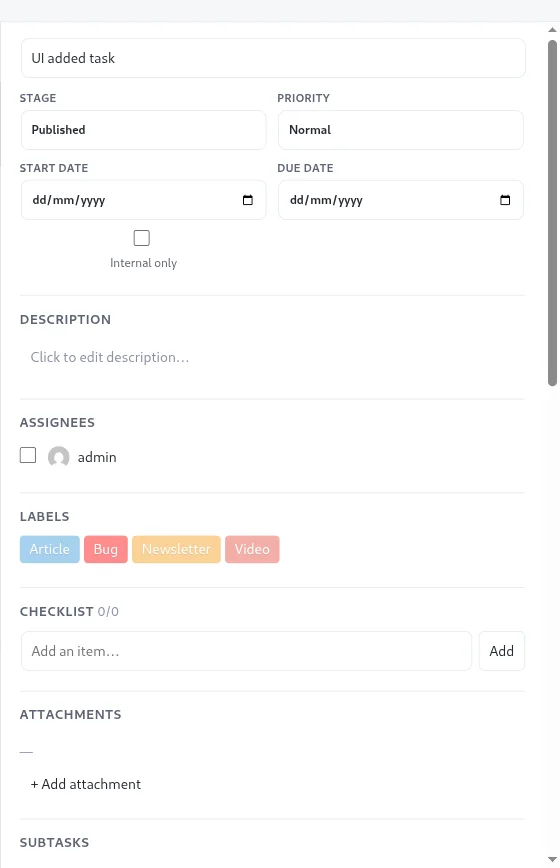
Warning signs from the template can go into the description of a single “Watch list” task, so the team sees them at each review.
For the planning steps that come before a premortem, read project planning steps and how to break a project into tasks.
Frequently asked questions
What is a premortem?
A premortem is a planning exercise described by psychologist Gary Klein in Harvard Business Review in 2007. Before a project starts, the team assumes it has already failed, writes down every reason why, and then changes the plan to deal with the most serious reasons.
What is the difference between a pre mortem and a post mortem?
A pre mortem happens before the work starts and imagines a failure that has not happened. A post mortem happens after a project or incident ends and studies what really went wrong. A premortem changes the current plan, and a postmortem changes the next one.
How long does a premortem take?
Gary Klein writes that a premortem can take as little as 20 to 30 minutes, with two minutes for writing reasons. Atlassian's version plans 60 minutes for the session and 10 minutes to prepare.
Can you run a premortem for a sprint or a small project?
Yes. Keep the core steps: brief the plan, announce the failure, give two minutes of silent writing, collect one reason per person in turn, and pick the top risks.
Who should attend a premortem?
Everyone who will work on the project and knows the plan, including people who tend to stay quiet in meetings. Klein's article starts the round of reasons with the project manager.